
Digital certificates and badges are now the normal way to recognize learning, prove skills, and reward achievement. Whether you run a company training program, a university, a coding bootcamp, or an online course, the platform you pick changes how professional your certificates look and whether people can trust them years later.
This guide compares the main platforms, explains what actually matters when you choose one, and shows where each option fits best.
Why the Platform You Choose Actually Matters
A certificate is only as good as the system behind it. Anyone can make a certificate design in a graphics tool, but a picture is not the same as a real credential. A real credential needs to be:
- Verifiable. Someone who receives it, like an employer or an admissions officer, should be able to check that it is real.
- Durable. The record should still work years later. It should not disappear just because someone deleted a file from their laptop.
- Brandable. The certificate should look like it came from your organization, not from a generic template.
- Scalable. Whether you are issuing 50 certificates or 50,000, the process should not multiply your work.
- Secure. It should be hard to copy, fake, or reissue without permission. This matters even more in industries with compliance rules.
Organizations that skip this step often end up switching platforms within a year. That means moving thousands of records and retraining staff. Choosing carefully the first time saves that cost later.
How This List Was Put Together
This comparison is based on public product pages, pricing pages, and feature lists for each platform, along with common needs seen in corporate training and education: bulk issuing, verification, template design, and integrations. Pricing and features can change, so it is worth checking each provider’s site directly before you buy.
At a Glance: Top Digital Certificates and Badges Platforms
| Platform | Best For | Bulk Issuance | Badge Support | Verification | Standout Strength |
| MixCertificate | Businesses, event organizers, training providers needing fast bulk output | Yes, built for high volume | Yes | Unique ID / QR code | Speed, simplicity, affordable bulk generation |
| Accredible | Universities and large enterprise credentialing | Yes | Yes | Blockchain-backed option | Deep enterprise integrations |
| Credly (a Pearson company) | Skills-based digital badges at scale | Yes | Yes, badge-first design | Open Badges standard | Badge ecosystem and employer recognition |
| Canva (manual templates) | One-off, small-batch certificates | No, manual only | Limited | None built in | Design flexibility for non-technical users |
| Certifier | Small to mid-size course creators | Yes | Yes | Link-based | Easy setup for solo educators |
| Google Forms + add-ons | Very small internal use | Limited | No | None | Free, but not built for scale |
This table is a starting point. Below, each platform gets a closer look, along with the kind of organization it fits best.
1. MixCertificate: Best for Bulk Digital Certificates and Fast Turnaround
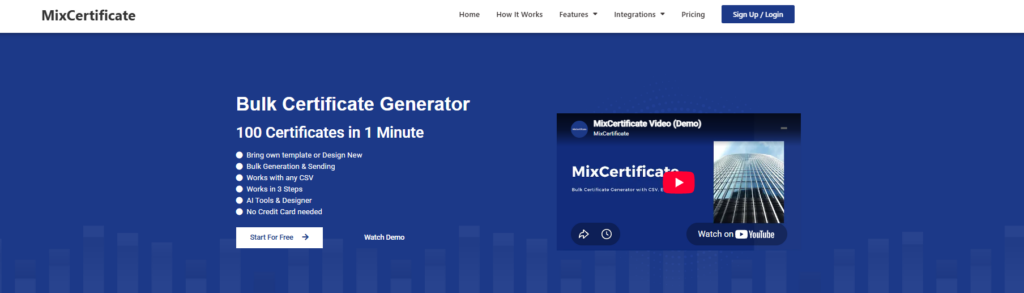
MixCertificate is built for the exact problem most training teams, event organizers, and L&D departments run into: needing to issue a large batch of certificates fast, without a design background or a developer on staff.
Instead of editing a template one person at a time, you upload a list of names (or connect a spreadsheet), apply it to a certificate design, and generate the whole batch at once. Each certificate gets a unique ID, so recipients and employers can confirm it is real instead of trusting a plain PDF that anyone could edit.
What stands out when teams compare MixCertificate to other options:
- Fast bulk generation. Sending certificates to 300 workshop attendees or a few thousand course graduates does not need custom development work.
- Simple pricing. Costs scale with actual use instead of locking you into a rigid enterprise contract built for much bigger institutions.
- Flexible templates. You can match your brand colors, logo, and signatures without hiring a design agency.
- Easy to start. Teams without an IT or design department can send out a full batch of certificates the same day they sign up.
- Low-risk payment. MixCertificate sets up its purchase process so buying a plan carries no payment risk to you. Worth checking the pricing page directly if that matters to you.
If your main need is “we run frequent training, webinars, or events and need professional, verifiable certificates without a steep learning curve,” MixCertificate is usually the most practical place to start.
2. Accredible: Best for Universities and Large Enterprises

Accredible is popular with universities, bootcamps, and large enterprise learning teams. Its strength is integrations. It connects to learning management systems, single sign-on tools, and HR platforms that big institutions already use.
It also offers blockchain-backed verification as an option, which appeals to institutions that want extra tamper-proofing beyond a standard unique ID. The tradeoff is that its pricing and setup usually fit bigger budgets and longer rollout timelines than most smaller training providers need.
3. Credly: Best for Skills-Based Digital Badges
Credly, now part of Pearson, is one of the best-known names in digital badges specifically, not certificates. It follows the Open Badges standard, so badges issued through Credly carry data that other systems and employers can read.
This makes Credly a strong pick for organizations focused on skills recognition. For example, a professional certification body that wants badge holders to show their credential on LinkedIn with verifiable data behind it. Credly leans more toward badges as digital objects and less toward traditional printable certificates.
4. Canva: Best for One-Off or Small-Batch Design

Canva is not a credentialing platform in the same way as the others here, but it deserves a mention since so many small organizations start with it. Its certificate templates look polished and are easy to customize for a single event or a handful of people.
The limit is scale and verification. Canva certificates are static designs. There is no built-in way to bulk-generate hundreds of personalized files, and no way for anyone to verify a certificate after the fact. For a one-time award ceremony with a dozen people, this can be enough. For anything recurring or at volume, it becomes a bottleneck fast, which is often exactly when organizations start comparing dedicated platforms like MixCertificate.
5. Certifier: Best for Independent Course Creators
Certifier is aimed at solo educators and small course businesses who want a simple way to issue certificates alongside an online course. Setup is quick and built for people without technical backgrounds. Verification usually works through a shareable link rather than a formal registry, which is enough for most small learning products but less robust than enterprise-grade platforms.
6. Google Forms and Manual Add-Ons: Best for Very Small Internal Use

Some small teams put together a certificate process using Google Forms, Sheets, and a mail-merge add-on. This costs nothing beyond an existing Google Workspace account, which makes it tempting for internal-only recognition, like a small team finishing an internal training module.
The ceiling is low, though. There is no real verification system, formatting is limited by what mail-merge tools can do, and the process becomes hard to manage once volume grows past a small handful of certificates per batch.
Certificates vs. Badges: What Is the Real Difference?
Worth clarifying before you pick a platform, since not every provider handles both equally well.
A certificate is usually a document-style credential, a PDF or printable page that confirms someone finished a course, attended an event, or met a requirement. It is meant to be downloaded, printed, or attached to an email.
A badge is a digital object, usually a small image with data built in, meant to be shown on a profile like LinkedIn or shared as a link. Badges are built for portability across platforms, following standards like Open Badges so the achievement data travels with the image.
Many organizations need both: a certificate for formal records (say, an HR file or compliance record) and a badge for public display. Some platforms, including MixCertificate, focus on certificate generation with speed and brand customization, while badge-first platforms like Credly focus more on the data and portability side. Deciding which one matters more for your use case will narrow the list a lot.
Key Features to Check Before You Buy
When comparing platforms, test these before you commit to a paid plan:
- Bulk upload support. Can you upload a spreadsheet and generate hundreds or thousands of certificates in one step, or does each one need to be made by hand?
- Verification method. Does the platform give people a way to confirm a certificate is real, through a unique ID, QR code, or public verification page?
- Template customization. Can you match your branding, including logo, colors, and signatures, without hiring a designer?
- Integration options. Does it connect to your existing LMS, event registration tool, or CRM, or will you export and import data by hand every time?
- Pricing model. Is pricing based on actual use, which scales with your needs, or a flat enterprise license that may be more than smaller operations need?
- Support and onboarding. If your team hits a problem mid-batch, is help available quickly, or are you stuck waiting on a ticket queue?
- Data security and payment safety. Most of these platforms need an upfront purchase or subscription, so check that the vendor’s payment terms are clear and low-risk before entering card details. MixCertificate addresses this directly by making its checkout process risk-free for buyers.
Frequently Asked Questions
Are digital certificates as credible as printed ones?
Yes, when they come from a platform with real verification. A digital certificate with a unique ID or QR code that leads to a verification page is usually more trustworthy than a printed certificate, which can be copied or changed with no way to check where it came from.
Do I need separate tools for certificates and badges?
Not always. Some platforms, like MixCertificate, focus on certificates with strong bulk features, while others specialize in badges with data standards built in. If you need both, check whether one platform covers your main use case well enough before adding a second tool.
How much does a certificate platform usually cost?
Pricing varies a lot: from free manual tools that do not scale well, to usage-based plans built for growing organizations, to enterprise contracts made for large universities. For most small and mid-size training providers and event organizers, a usage-based plan like the one MixCertificate offers usually fits the budget better than an enterprise license built for institutions issuing tens of thousands of credentials a year.
Can a digital certificate be faked or duplicated?
Any static image or PDF without a verification method can be copied. This is exactly why unique IDs, QR codes, and blockchain-backed verification exist. They let someone check a certificate against the issuer’s records instead of just trusting the file itself.
What should I look for first when comparing platforms?
Start with your actual volume and use case. If you issue certificates rarely and in small batches, a simple tool may be enough. If you run recurring training, webinars, or events with growing attendance, prioritize bulk generation and verification first, then compare pricing.
Final Thoughts
There is no single “best” platform for every organization. The right choice depends on your volume, whether you need badge portability or certificate formatting, and your existing tools. Large universities with complex integration needs will likely lean toward enterprise-focused providers. Organizations focused on skills recognition and public badge display will get more value from badge-first platforms.
For most businesses, training providers, and event organizers who need to issue professional, verifiable certificates fast and at scale without enterprise-level cost or complexity, MixCertificate is built around exactly that gap. Bulk generation, brand-matched templates, and a simple, risk-free payment process make it a practical first stop before you look at pricier alternatives.
If you want to try it, visit mixcertificate.com and generate a sample batch. It is the fastest way to see whether it fits your workflow before committing to a bigger plan.
Also Read Related Blog :





6 Responses