You just wrapped up a 600-person virtual conference. Attendees are emailing asking for their certificates. Your team is manually typing names into a Word template, exporting PDFs one by , and sending individual emails.
Sound familiar?
This is exactly the kind of problem that event certificate software solves. Whether you are running a webinar, an in-person summit, a corporate training, or an online course, automating certificate generation saves you hours and makes your event look far more professional.
In this guide, we are breaking down the best certificate software for events and conferences in 2026, what features actually matter, and how to pick the right tool for your specific situation.
Why Event Organizers Need Certificate Software
Most event organizers underestimate how much time goes into certificates until they are drowning in post-event tasks.
Think about what manual certificate creation actually involves. You export your attendee list. You open a design tool. You copy and paste names one by one. You export each certificate as a PDF. Then you email each person individually or upload everything to a shared folder and hope people find their files.
For a 50-person event, that is already painful. For a 500-person event, it is simply not viable.
Certificate software handles all of this automatically. You set it up once, connect it to your attendee data, and the platform generates and delivers certificates without you lifting a finger after the event ends.
Beyond saving time, certificates also matter for attendee trust. A professional, branded certificate with a QR verification code tells your attendees that your event is credible. It gives them something worth sharing on LinkedIn. For events offering CPD credits or professional development hours, a verifiable certificate is not optional. It is required.
What to Look for in Event Certificate Software
Before jumping into specific tools, here is what separates genuinely useful certificate software from tools that just look good in a demo.
Bulk generation from attendee data. You should be able to upload a CSV or connect to your registration platform and have the software auto-populate every certificate. If you are doing this manually for each attendee, the tool is not saving you enough time.
Customizable templates. Your certificate should look like it came from your event, not from a generic template library. Look for tools that let you add your logo, use your brand colors, include your signature, and match your event’s visual identity.
QR code verification. This is increasingly important. A QR code on a certificate links to a hosted, verifiable record. Employers, licensing boards, and professional associations can scan it to confirm the certificate is real. Without this, your certificates are just fancy PDFs that anyone could fake.
Automated email delivery. The software should send certificates directly to attendees without you manually triggering each one. Bonus points if you can set conditions, like only sending a certificate if someone attended at least 80 percent of the session.
Integration with event platforms. If the tool does not connect with Zoom, Hopin, Eventbrite, or whatever platform you use, you are going to spend extra time exporting and importing data. Good integrations make the whole workflow seamless.
Digital signatures. For compliance-heavy events, especially in healthcare, legal, or finance industries, you need an authorized digital signature on the certificate. Some tools make this easy. Others do not support it at all.
The Best Certificate Software for Events and Conferences
1. MixCertificate
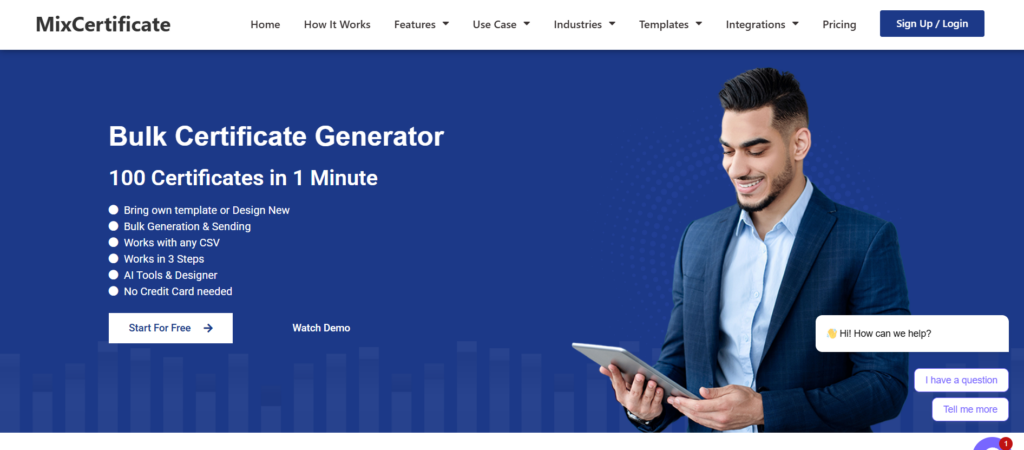
If you want one tool that handles everything from template design to bulk generation to automated delivery, MixCertificate is the standout option in 2026.
Visit https://www.mixcertificate.com/ to see what the platform offers.
MixCertificate was built specifically for event organizers, educators, and community managers who need to issue certificates at scale without a complicated setup. The platform is clean, fast, and genuinely easy to use even if you have never set up an automated certificate workflow before.
Here is what makes it worth using:
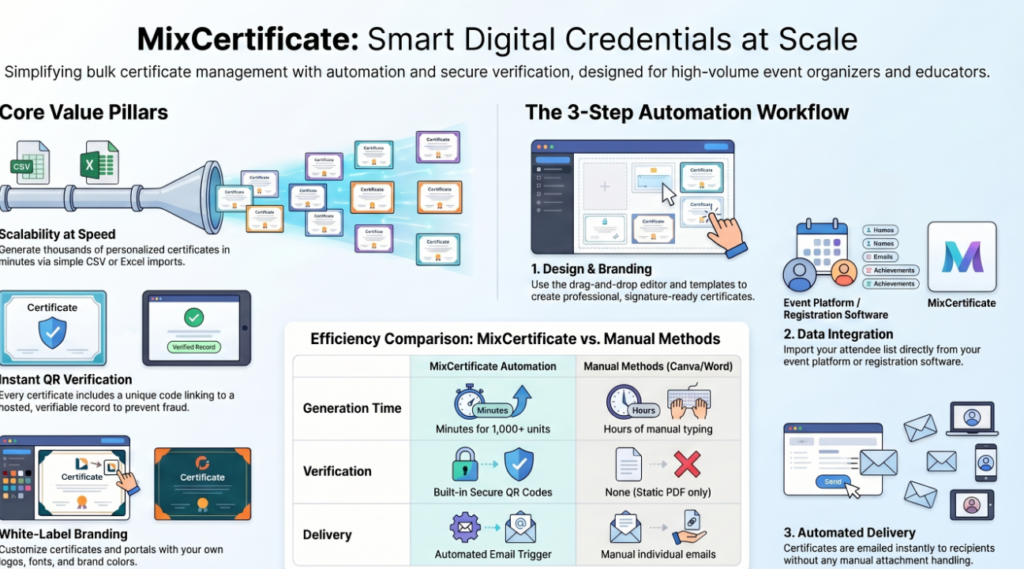
You can build a fully branded certificate using the drag-and-drop editor. Add your event logo, choose your fonts, set your colors, and include a digital signature in minutes. The template library gives you a solid starting point, and customization is intuitive enough that you do not need a designer to make it look professional.
The bulk generation feature is where MixCertificate really earns its place. Upload your attendee list as a CSV and the platform fills in every certificate automatically. For a 1,000-person conference, what used to take a full day of manual work gets done in minutes.
Every certificate generated through MixCertificate includes a QR verification code. Scan it and it takes you to a hosted credential page that confirms the certificate is authentic. This is a feature that separates professional events from amateur ones, and MixCertificate includes it by default.
The automated email delivery is straightforward to set up. Once your certificates are generated, the platform sends them directly to each attendee’s inbox. No mail merges. No attachment uploading. No chasing down email addresses.
You can get started and generate your first certificates at https://app.mixcertificate.com/
Best for: Event organizers, webinar hosts, corporate trainers, online course creators, conference organizers handling events of any size.
Pricing: Free tier available for smaller events. Paid plans scale based on volume and additional features.
2. Accredible

Accredible has been around for a while and is well-known in the professional certification and digital badge space. It works well for events where the certificate doubles as a formal professional credential, especially in continuing education, healthcare training, or technical certifications.
The platform supports both certificates and open digital badges, which is useful if your organization needs to align with international credentialing standards. LinkedIn integration is solid, making it easy for attendees to share their credentials directly to their profiles.
The downside is that Accredible can feel like more than you need if you are running a typical corporate webinar or conference. The pricing reflects its enterprise focus, and the setup process has more steps than tools like MixCertificate.
Best for: Professional associations, continuing education providers, organizations issuing formal credentials.
3. Sertifier

Sertifier is a straightforward option with a clean interface focused on webinar and online event certificates. It offers a good template library, Zoom integration, and automated email delivery that works reliably.
It handles bulk certificate generation well and the QR verification feature is included. For event organizers primarily running webinars and virtual events who want a simple setup, Sertifier is a reasonable choice.
Where it falls short compared to MixCertificate is in design flexibility. The templates are solid but customization options are more limited if you want something that really matches your brand.
Best for: Webinar organizers, online event hosts, virtual training programs.
4. Canva plus Zapier
If you are running small events on a tight budget and you already use Canva for design work, you can cobble together a certificate workflow using Canva templates and Zapier automations.
The honest reality is that this approach works at small scale but breaks down quickly. Once you are dealing with more than 50 attendees, the manual steps in this workflow start to eat up significant time. There is also no built-in QR verification, no credential hosting, and no clean delivery mechanism.
It is a fine option for a one-off 20-person workshop. For anything larger or more frequent, a dedicated tool like MixCertificate is going to save you far more time than the DIY approach.
Best for: Very small events, one-off workshops, budget-constrained organizers just getting started.
5. Badgr (Open Badges)

Badgr is the right tool when your organization specifically needs to issue credentials that comply with the IMS Open Badges standard. This matters in academic settings, nonprofit professional development programs, and some government-adjacent training programs.
Open badges are interoperable, which means recipients can store them in any compatible digital wallet and present them across different platforms. If compliance with that standard is a requirement for your event, Badgr is worth looking at.
For general event and conference certificate needs, it is more framework than most organizers need.
Best for: Academic institutions, programs requiring Open Badges compliance, nonprofit professional development.
Comparison Table: Top Event Certificate Tools
| Tool | Bulk Generation | QR Verification | Automated Email | Templates | Starting Price |
| MixCertificate | Yes | Yes | Yes | Yes | Free tier |
| Accredible | Yes | Yes | Yes | Yes | Paid plans |
| Sertifier | Yes | Yes | Yes | Limited | Free tier |
| Canva + Zapier | Manual | No | Manual | Yes | Free + Zapier |
| Badgr | Yes | Yes | Yes | Limited | Free tier |
Best Certificate Software by Use Case
Best for large conferences (500 plus attendees): MixCertificate. The bulk generation and automated delivery handle high volumes without any extra effort on your end.
Best webinar certificate software: MixCertificate or Sertifier. Both connect with popular webinar platforms and automate the post-event certificate workflow.
Best for CPD or CME accredited events: Accredible. The platform is built for formal professional credentialing with the compliance features that come with it.
Best free event certificate generator: MixCertificate free tier. You can generate professional certificates with QR verification without paying anything to start.
Best for virtual summits: MixCertificate. The combination of branded templates, bulk generation, and automated delivery makes it the cleanest option for multi-session virtual events.
How to Automate Certificate Generation for Your Next Event
Here is a simple workflow you can follow using a tool like MixCertificate:
Step 1: Set up your certificate template. Before the event, log into https://app.mixcertificate.com/ and build your certificate. Add your event name, logo, signature, and any relevant details like the date and credit hours.
Step 2: Prepare your attendee data. After the event, export your attendee list from your registration or webinar platform. Make sure you have first name, last name, and email address at minimum.
Step 3: Upload your attendee list. Import the CSV into MixCertificate. The platform will match the data fields to your template variables automatically.
Step 4: Generate certificates in bulk. Trigger bulk generation and MixCertificate creates a personalized, QR-verified certificate for every attendee in your list.
Step 5: Send certificates. Set up automated email delivery and each attendee receives their certificate directly in their inbox. You can customize the email message to match your event’s tone.
Step 6: Track delivery. Check your dashboard to see who has opened and downloaded their certificate. Follow up with anyone who has not yet claimed theirs.
The whole setup takes under an hour the first time. For repeat events, it takes even less once your template is ready.
Why QR Verification Matters for Event Certificates
A lot of event organizers skip QR verification because it sounds technical or optional. It is neither.
QR verification is what separates a certificate that feels credible from one that looks like it was made in Word. When someone receives a certificate with a QR code, they can share it confidently knowing anyone can scan it and confirm it is real.
For attendees, this matters when they put the certificate on their LinkedIn profile, share it with an employer, or submit it for professional development records. A verifiable certificate carries actual weight. A PDF without verification is just a design file.
Tools like MixCertificate include QR verification on every certificate by default. There is no extra setup. Every certificate automatically links to a hosted credential page that confirms the details.
Event Certificate Templates: What Should Be on Every Certificate
A professional event certificate should include at minimum:
The attendee’s full name, clearly legible and prominently placed. The name of the event. The date the event took place. The name and signature of the issuing authority, whether that is your organization’s director, lead trainer, or event chair. Your organization’s logo. A unique certificate ID. A QR code linking to the verification page.
For events offering credit hours, include the number of hours and the accrediting body if applicable. For multi-day conferences, consider including a brief description of the topics covered.
Design-wise, landscape orientation tends to read better for certificates. Keep the layout clean and give the attendee’s name enough space to be the visual focal point.
Frequently Asked Questions
What is the best free certificate generator for events?
MixCertificate offers a free tier that includes customizable templates, bulk generation, and QR verification. It is the strongest free option available for event organizers in 2026. Get started athttps://app.mixcertificate.com/
How do I send certificates to 500 or 1,000 attendees at once?
Use a tool with bulk generation and automated email delivery. Upload your attendee list as a CSV, generate all certificates at once, and let the platform send them automatically. MixCertificate handles this cleanly without any manual steps.
Can I add QR codes to event certificates?
Yes, and you should. Platforms like MixCertificate include QR verification by default. The QR code links to a hosted page that confirms the certificate is authentic, which is valuable for your attendees and your event’s credibility.
What is the difference between a digital badge and a certificate?
A certificate is a document recognizing attendance or completion. A digital badge is a smaller credential that can be embedded in websites, email signatures, and LinkedIn profiles, and typically follows the Open Badges standard for interoperability. Some platforms offer both. For most events, a certificate is sufficient.
Do I need event certificate software or can I use Canva?
Canva works for very small, one-time events. Once you are dealing with 50 or more attendees, or running events regularly, dedicated certificate software saves significant time and adds features like QR verification and automated delivery that Canva simply does not offer.
Final Verdict
If you are looking for one recommendation, MixCertificate is the best event certificate software for most organizers in 2026.
It handles everything in one place: template design, bulk generation, QR verification, and automated delivery. The free tier lets you test it before committing, and the paid plans scale affordably as your events grow.
Go to https://www.mixcertificate.com/ to explore the platform, and head directly to https://app.mixcertificate.com/ to build your first certificate template before your next event.
For organizers running formal credentialing programs with strict compliance requirements, Accredible is worth the extra complexity and cost. For everyone else, MixCertificate gives you everything you need without the overhead.
Stop sending certificates manually. Your attendees deserve better, and so does your post-event workflow.
Also Read Related Blog :





8 Responses