
Every teacher, trainer, and course creator reaches the same point. A student finishes a course, completes a workshop, or earns a badge, and you need a good looking certificate. Whether you teach a small class or run large training programs, the right Certificate Makers for Educators tool saves time and keeps learners motivated.
This guide explains the best certificate maker tools in 2026 in simple language and helps you choose the right one.
Why Educators Need a Certificate Tool
Many apps can design certificates, but most are not built for education. They treat certificates like simple design items instead of important academic records.
Educators need tools that can do these things
- Create many certificates at once
- Personalize each certificate with student names
- Download or send certificates easily
- Use professional templates without design skills
Good tools make the process fast and automatic.
Quick Comparison
| Tool | Best Use | Bulk Generation | Free Plan | Branding Support |
| MixCertificate | Large-scale certificate creation, training programs, online courses | Yes, very large batches | Yes | Yes |
| Canva | Simple certificate design and one-time use | No | Yes | Limited |
| Certifier | Digital badges, verified certificates, credential management | Yes | Limited free plan | Yes |
| Visme | Presentations, visual content, and certificate design | No | Limited | Paid only |
| Google Slides | Free manual certificate creation and editing | No | Yes | Manual only |
1. MixCertificate Best Overall for Educators
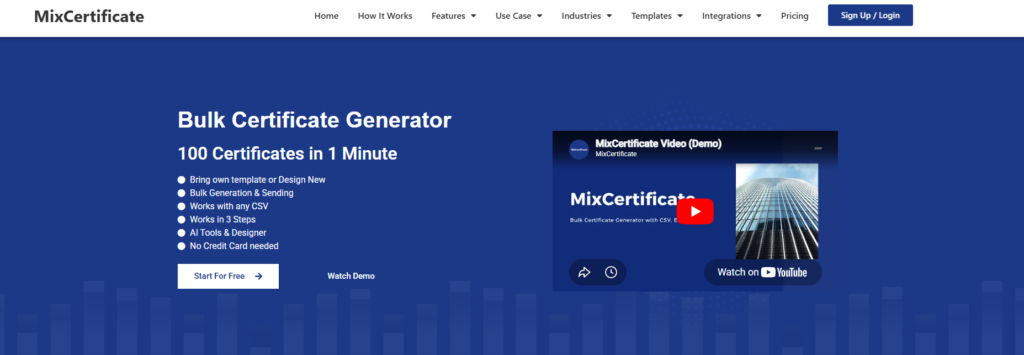
MixCertificate is made for teachers, trainers, HR teams, and event organizers who need many certificates at once.
You can upload a list of names using a spreadsheet. Then choose a template and the tool creates all certificates automatically. It saves a lot of time compared to manual editing.
It also works very well for webinars. You can export attendee lists and send certificates right after the session ends.
Key features include
- Bulk certificate creation from spreadsheet data
- Automatic email delivery
- Download as PDF files
- Shareable certificate links
- Professional templates for education
- Custom logo and brand colors
Pros
- Very fast bulk generation
- Easy email sending
- Good for webinars and training
- Simple templates for education
- Free plan available
Cons
- Limited advanced design control
- Best for medium or large batches
Best for teachers, trainers, webinar hosts, and institutions that issue certificates regularly.
2. Canva Best for Simple Design Work

Canva is a popular design tool with many certificate templates.
It is good for making single certificates but not for large groups. You have to edit each certificate one by one, which takes time.
Pros
- Beautiful designs
- Easy drag and drop editor
- Free version available
Cons
- No bulk generation
- Not built for certificate automation
- Branding features mostly paid
Best for small classes or one time awards.
3. Certifier Best for Digital Credentials

Certifier focuses on digital certificates and badges that can be verified online.
Students can share certificates on LinkedIn or add them to portfolios. It is useful for professional training programs.
Pros
- Verified digital certificates
- LinkedIn sharing options
- LMS integration available
Cons
- Limited free usage
- Not ideal for simple school certificates
- Can become expensive for large batches
Best for online courses and professional training programs.
4. Visme Best for Existing Users

Visme is mainly a design and presentation tool that also includes certificate templates.
It has good design quality but no automation. Each certificate must be created manually.
Pros
- High quality designs
- Good if already using Visme
- Many templates available
Cons
- No bulk certificate creation
- Paid plans needed for full features
- Not focused on certificates
Best for teams already using Visme for other content work.
5. Google Slides Best Free Option

Google Slides is not a certificate tool but many educators still use it.
You create one certificate design and then duplicate it for each student. You can also use scripts to automate name changes, but that needs technical skills.
Pros
- Free to use
- Easy to access
- Simple export as PDF
Cons
- No built in automation
- Time consuming for large groups
- Requires manual editing
Best for very small groups and zero budget use.
What to Look for in a Certificate Maker
Before choosing a tool, check these important features.
Bulk creation
You should be able to generate many certificates at once using a list of names.
Good templates
Certificates should look professional and clean.
Brand customization
You should be able to add logo, colors, and school or company identity.
Easy delivery
Look for PDF download, email sending, or shareable links.
Simple workflow
A good tool should let you create certificates in minutes without training.
Best Use Cases
Teachers
Best option is MixCertificate for class awards and student recognition
Corporate trainers
Best option is MixCertificate for large training programs and compliance certificates
Webinar hosts
Best option is MixCertificate for fast certificate delivery after sessions
Online course creators
MixCertificate is best for simple certificates while Certifier is better for verified digital badges
Frequently Asked Questions
Can I create certificates for free
Yes many tools offer free plans including MixCertificate, Canva, and Certifier
What is best for teachers
MixCertificate is best for class size and bulk certificate needs
How do I create certificates for many students
Upload a spreadsheet of names into a bulk certificate tool and generate all certificates automatically
Can I add a logo
Yes most tools allow logo and branding uploads
What format do certificates come in
Most tools provide PDF files and some also offer image formats like PNG
Final Call
If you are an educator or trainer, the most important thing is saving time and avoiding manual work.
Canva is good for design only.
Google Slides is free but slow.
Certifiers are best for digital credentials.
Visme is good only if you already use it.
For most teachers and trainers in 2026, MixCertificate is the best choice because it is fast, simple, and built for bulk certificate creation.
Also Read Related Blog :





7 Responses