Introduction
Sending out 500 employee certificates one by one is not a good use of anyone’s time.
Whether you are recognizing staff at an annual awards event, issuing training completion certificates, or sending course diplomas to students, doing it manually creates a mess. You end up with inconsistent designs, wasted hours, and a pile of errors that someone has to fix later.
That is exactly why bulk certificate generator tools exist.
The right tool lets you upload a spreadsheet, pick a design, and send out hundreds of personalized certificates in minutes. No design skills needed. No chasing people to print and sign documents.
This guide covers the top 10 tools available right now, who each one works best for, and how to pick the right one for your situation.
What to Look For in a Bulk Certificate Generator
Before jumping into the list, here are the features that actually matter:
- CSV or spreadsheet import: You should be able to upload a list of names and have the tool auto-fill each certificate. Without this, bulk generation is not really bulk.
- Custom templates: The tool should let you use your own logo, colors, and layout, not just pre-made designs that look generic.
- Automated delivery: Email delivery built into the tool saves time. Otherwise you are downloading 200 PDFs and sending them manually.
- Verification links: Digital certificates with a shareable verification link are far more useful than a plain PDF.
- API access: If you are building certificates into an internal system or LMS, API access is a must.
- Pricing that scales: Some tools charge per certificate, which gets expensive fast. Look for flat-rate or volume pricing if you are generating at scale.
The Top 10 Bulk Certificate Generator Tools
1. MixCertificate
Website: https://www.mixcertificate.com/
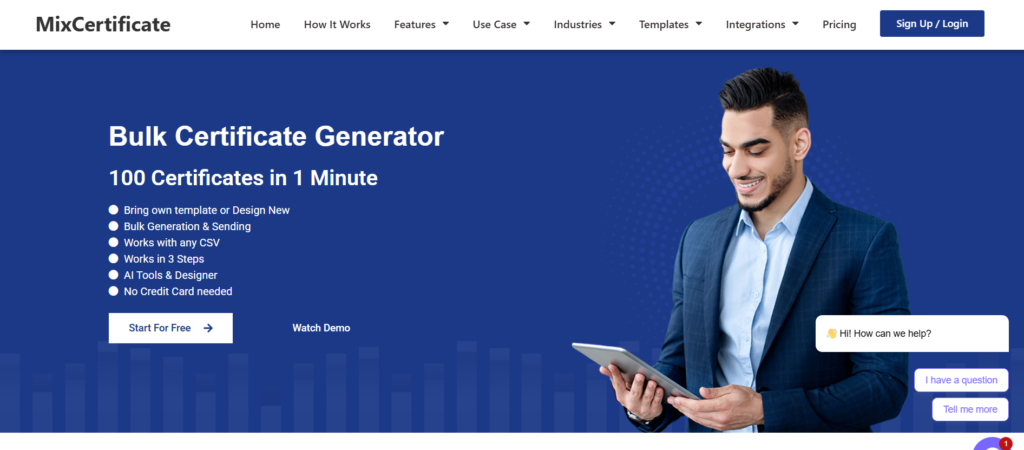
MixCertificate is built for teams and individuals who need to generate certificates in bulk without making it a project in itself. It is one of the most straightforward tools on this list, and it covers the full workflow from design to delivery.
You start by picking or building a template. You can upload your own logo, change fonts, adjust layout, and add your organization’s branding. Once your template is ready, you upload a CSV file with the recipient names and any other fields you want to personalize, like their course name, score, or date. MixCertificate auto-fills each certificate and lets you download them all or send them directly by email.
Each certificate gets a unique verification link, so recipients can share a proof of completion that anyone can check online. This is useful for professional training programs and course providers where employers may want to verify credentials.
For developers and HR teams using internal systems, MixCertificate also offers API access so you can trigger certificate generation automatically from your own platform.
Pros:
- Clean, easy-to-use interface
- CSV upload for bulk generation
- Email delivery built in
- Verifiable digital certificates with shareable links
- API access for developers
- Custom branding and templates
Cons:
- Relatively newer platform compared to some legacy tools
- Advanced integrations still expanding
Best For: HR teams running employee recognition programs, online course providers, training companies, and developers building certificate workflows into existing systems.
2. Certifier

Website: certifier.io
Certifier is a well-known certificate platform that focuses on digital credentials with verification. It works well for organizations that want to issue certificates that recipients can share on LinkedIn or embed on a portfolio.
The platform has a drag-and-drop editor, CSV bulk upload, and automated email sending. It also connects with tools like Zapier, which helps automate the workflow.
Pros:
- Strong LinkedIn sharing integration
- Zapier and webhook support
- Clean recipient management dashboard
Cons:
- Free plan is limited in volume
- Pricing scales up quickly for large teams
Best For: Online educators and course platforms that want shareable digital badges and credentials.
3. Accredible
Website: accredible.com
Accredible is one of the older players in the digital credential space. It is commonly used by universities and large training organizations. It supports both certificates and open badges.
The platform integrates with several LMS tools like Canvas and Moodle, which makes it a good fit for education providers who already use those systems.
Pros:
- LMS integrations (Canvas, Moodle, etc.)
- Open badge support
- Strong analytics on certificate engagement
Cons:
- Higher cost, aimed at enterprise buyers
- Setup takes longer than simpler tools
Best For: Universities, corporate learning platforms, and organizations already using an LMS that Accredible integrates with.
4. Canva (Bulk Create)

Website: canva.com
Most people know Canva as a design tool, but it also has a Bulk Create feature that lets you generate multiple personalized certificates from a data set. You connect a spreadsheet to a template and Canva fills in each row as a separate design.
It is not purpose-built for certificates, and it lacks automated email delivery, but the design flexibility is hard to beat.
Pros:
- Huge template library
- Familiar interface, very easy to use
- Works for many document types beyond certificates
Cons:
- No automated email delivery
- No verification links
- Bulk Create is only available on paid plans
Best For: Small teams and individual educators who already use Canva and need a simple way to generate personalized designs without learning a new tool.
5. Google Slides + AutoCrat
Website: Add-on found in Google Workspace Marketplace
AutoCrat is a free Google Sheets add-on that merges spreadsheet data into a Google Slides or Google Docs template. It is one of the most popular free options for educators and small organizations.
You set up your template in Google Slides, map the columns from your sheet, and AutoCrat generates a personalized PDF or Google Doc for each row. You can also trigger automated emails.
Pros:
- Completely free
- Works inside Google Workspace
- Good for educators on tight budgets
Cons:
- Requires some setup and technical comfort
- Design options limited to what Google Slides supports
- Not ideal for large volumes
Best For: Teachers and small nonprofits who want a free solution and are comfortable with Google Workspace.
6. Venngage
Venngage is primarily an infographic and report design tool, but it also offers certificate templates. You can customize designs and export them. It does not have CSV bulk generation built in, so it works better for small volumes.
Website: venngage.com
Pros:
- High quality, professional templates
- Good design flexibility
Cons:
- No native bulk generation from spreadsheet data
- No email delivery or verification
Best For: Teams that want to design a single high-quality certificate and print or distribute it manually.
7. Fotor
Website: fotor.com
Fotor is an online photo editor with a certificate maker section. It is useful for creating one-off certificates with a polished look. Bulk generation is not a core feature.
Pros:
- Easy to use, no design experience needed
- Good for single certificate creation
Cons:
- No bulk upload or automation
- No delivery or verification features
Best For: Personal use or very small-scale certificate needs.
8. Open Badges (Badgr / BadgeList)

Websites: badgr.com / badgelist.com
Open Badges is a standard for digital credentials developed by IMS Global. Tools like Badgr and BadgeList help organizations issue badges that follow this standard. Recipients can collect their badges in a backpack and share them across platforms.
Pros:
- Follows open standards, widely recognized
- Good for professional development programs
Cons:
- Badge format is not always what people expect for certificates
- Interface can feel dated compared to newer tools
Best For: Organizations in education and workforce development that need credentials to meet an open standard.
9. Diploma.com
Website: diploma.com
Diploma.com is built for schools and academic institutions. It offers premium printed certificate and diploma printing services, with design tools and templates tailored for academic use.
Pros:
- High-quality physical printing
- Purpose-built for academic certificates
Cons:
- Focused on print, not digital delivery
- More expensive than digital-only tools
Best For: Schools and universities that want professionally printed diplomas and certificates.
10. Certificate Magic
Website: certificatemagic.com
Certificate Magic is a basic free tool that lets you fill in a certificate template online and download it as an image or PDF. It is simple and quick for one-off needs.
Pros:
- Completely free
- No account needed
- Quick to use
Cons:
- Very limited templates
- No bulk generation
- No delivery or verification
Best For: Someone who needs a single certificate right now and does not want to sign up for anything.
Feature Comparison Table
| Tool | Bulk CSV | Email Delivery | Verification | API | Free Plan | Best For |
| MixCertificate | Yes | Yes | Yes | Yes | Yes | HR teams, course providers, developers |
| Certifier | Yes | Yes | Yes | Yes | Limited | Online educators, course platforms |
| Accredible | Yes | Yes | Yes | Yes | No | Universities, enterprise LMS users |
| Canva Bulk Create | Yes | No | No | No | No (paid) | Small teams, individual creators |
| Google Slides + AutoCrat | Yes | Yes | No | No | Yes (free) | Teachers, nonprofits |
| Venngage | No | No | No | No | Limited | Single certificate design |
| Fotor | No | No | No | No | Yes | One-off personal use |
| Open Badges (Badgr) | Yes | Yes | Yes | Yes | Yes | Education, workforce development |
| Diploma.com | Yes | No | No | No | No | Printed academic certificates |
| Certificate Magic | No | No | No | No | Yes | Single quick certificate |
How to Choose the Right Tool
Here is a simple way to think about it:
If you are in HR and need to send employee recognition or training certificates regularly, MixCertificate gives you the most complete workflow without requiring technical setup. You can start with a template, upload your CSV, and send everything in one place. The verification link feature is also useful when employees want to share credentials on a resume or LinkedIn.
If you are a teacher or running a small nonprofit on a tight budget, Google Slides with AutoCrat is free and works well once you get it set up.
If your organization uses an LMS like Moodle or Canvas, Accredible may save you time by connecting directly to your existing system.
If you are a developer building certificate generation into a product or internal tool, look for tools with a proper API. MixCertificate and Certifier both offer this.
How to Generate Bulk Certificates with MixCertificate (Quick Start)
- Go to https://app.mixcertificate.com/register/ and create a free account.
- Open the template editor and start with a blank canvas or choose an existing layout. Add your organization logo, adjust the colors to match your branding, and set up the fields you want to personalize (name, course title, date, etc.).
- Prepare your CSV file. Each row should be one recipient. Include columns for each field your template uses, such as Name, Course, and Date.
- Upload the CSV in the bulk generation section. MixCertificate will preview each certificate so you can confirm everything looks right before sending.
- Choose to download all certificates as a ZIP file or send them directly by email. Each recipient gets a personalized certificate with their own unique verification link.
The whole process from setup to sending can take under 30 minutes for most teams.
Frequently Asked Questions
Can I generate certificates from a Google Sheet?
Yes. With tools like MixCertificate, you can export your Google Sheet as a CSV and upload it directly. Some tools like AutoCrat connect directly to Google Sheets without needing to export.
What is a verifiable certificate?
A verifiable certificate has a unique link that anyone can open to confirm the certificate is real and was issued by a specific organization. This is useful for professional training and course completion because employers or clients can check credentials without contacting you.
Is there a free bulk certificate generator?
Yes. Google Slides with AutoCrat is free. MixCertificate also has a free plan you can start with at https://app.mixcertificate.com/register/. For very small volumes, Certificate Magic is free with no signup required.
How do I add my own logo to a certificate?
Most tools on this list let you upload a logo image file (PNG or JPG) directly in the template editor. In MixCertificate, you can drag and drop your logo onto the canvas and resize it to fit your layout.
Can I send certificates automatically when someone completes a course?
Yes, if the tool has API access or a Zapier integration. MixCertificate offers API access so developers can connect it to an LMS or any platform that triggers events on course completion. Certifier and Accredible also support this through Zapier.
What file format do certificates come in?
Most tools export PDF. Some also export PNG or JPG. PDF is the most useful format because it preserves the layout across devices and is easy to print.
Final Comparison at a Glance
| Tool | Bulk Gen. | Email Del. | Verification | API | Pricing Start | Verdict |
| MixCertificate | Yes | Yes | Yes | Yes | Free | Best overall for HR and course providers |
| Certifier | Yes | Yes | Yes | Yes | Free (limited) | Great for shareable digital credentials |
| Accredible | Yes | Yes | Yes | Yes | Paid | Best for enterprise and LMS users |
| Canva Bulk Create | Yes | No | No | No | Paid plan | Best for design-focused users |
| AutoCrat | Yes | Yes | No | No | Free | Best free option for educators |
| Venngage | No | No | No | No | Paid | Design only, no automation |
| Fotor | No | No | No | No | Free | One-off personal use |
| Badgr | Yes | Yes | Yes | Yes | Free | Best for open badge standards |
| Diploma.com | Yes | No | No | No | Paid | Best for printed academic certificates |
| Certificate Magic | No | No | No | No | Free | Quickest single certificate |
If you are looking for one tool that handles the full process — from design to delivery to verification — MixCertificate is the one to start with. It covers everything HR teams and course providers need without requiring technical expertise.
Also Read Related Blog :





3 Responses