Running an event is more than just booking a venue or setting up a Zoom link. The real work happens before and after. You need to collect registrations, manage attendee data, send reminders, track engagement, and then deliver certificates to everyone who showed up.
Most teams try to do all of this with a spreadsheet. And for a while, it works. But the moment your event crosses 100 attendees, manual processes start breaking down. Names get misspelled. Emails bounce. Certificates pile up in a to-do list that nobody has time to clear.
That is why event engagement software exists. And the best tools go a step further by connecting directly to your spreadsheets, CSV files, and APIs so everything flows without you having to do it manually.
In this guide, we cover the top 10 event engagement software platforms that support CSV imports, Excel uploads, Google Sheets integration, and API access. We also highlight which tools handle event certificates in bulk, because certificates are no longer just a “thank you” document. They have become one of the strongest engagement tools for modern events.
Certificates help attract more attendees because people see real value in participating. Students often submit certificates to their HOD or college department as proof of attendance for workshops, seminars, hackathons, and training programs. Employees share them with HR teams during appraisals, internal training evaluations, and professional development reviews. Freelancers and professionals add them to LinkedIn profiles, resumes, and portfolios to strengthen credibility.
For businesses and organizers, certificates also become a marketing asset. When attendees post their certificates on LinkedIn, Instagram, X, or WhatsApp status updates, your event brand reaches new audiences organically. One well-designed certificate shared by hundreds of attendees can generate more visibility than a paid campaign.
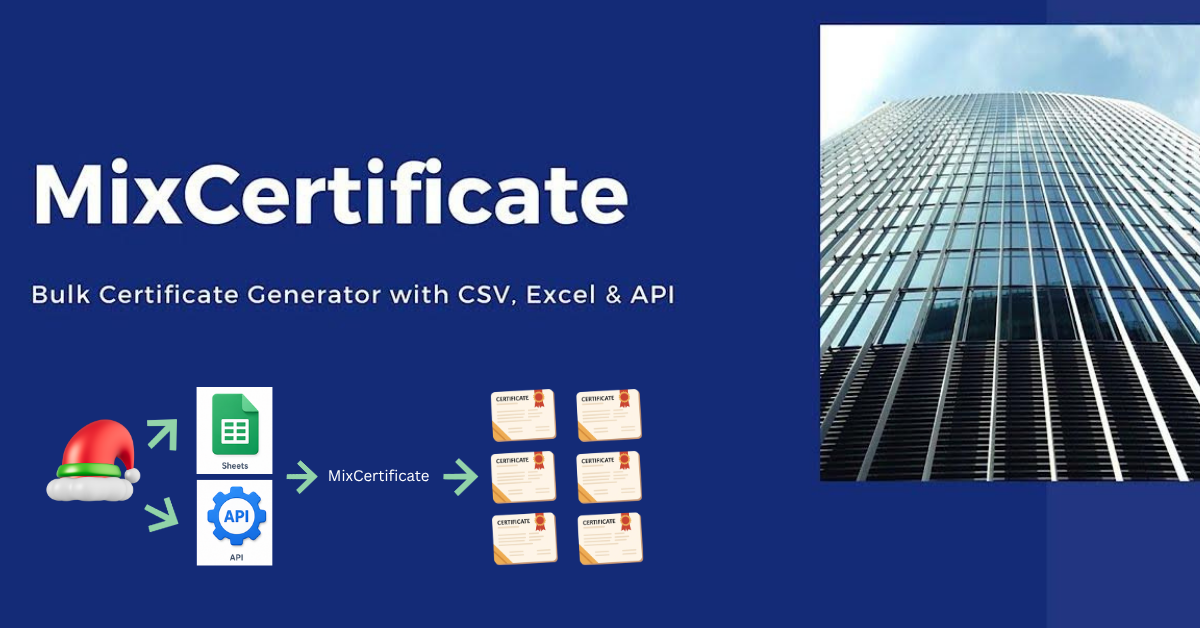
This is where platforms like MixCertificate stand out. Instead of manually creating and emailing certificates one by one, organizers can automate the entire process using CSV uploads, Google Sheets, APIs, and bulk certificate generation workflows. That means less operational work, better attendee experience, higher completion rates, and stronger post-event engagement.
Certificates also improve attendee retention and participation in ways many organizers underestimate:
- People are more likely to complete an event when a certificate is offered
- Webinar attendance rates increase when certificates are tied to participation
- Corporate employees attend internal training sessions more actively when completion certificates are provided
- Educational institutions use certificates as proof for attendance and skill-building programs
- Event organizers gain organic social media promotion through attendee shares
- Sponsors see higher perceived value when branded certificates are included
- Communities build long-term loyalty by rewarding participation consistently
In many cases, the certificate becomes the final emotional touchpoint of the event experience. A delayed or poorly managed certificate process can reduce attendee satisfaction, while instant automated delivery creates a professional impression and encourages repeat participation.
That is why modern event engagement software is no longer only about registrations and reminders. It is about building a complete attendee journey from sign-up to post-event recognition.
Quick Comparison Table
| Tool | Best For | CSV | Excel | Google Sheets | API | Certificates |
| MixCertificate | Bulk certificates + integrations | Yes | Yes | Yes | Yes | Yes |
| Whova | Attendee engagement apps | Yes | No | Via Zapier | Yes | No |
| Hopin | Virtual and hybrid events | Yes | Yes | Via Zapier | Yes | No |
| Eventbrite | Ticketing and registration | Yes | No | Via Zapier | Yes | No |
| Slido | Polls and live Q&A | No | No | Yes | Yes | No |
| Cvent | Enterprise event management | Yes | Yes | Limited | Yes | No |
| Airmeet | Community events | Yes | No | No | Yes | No |
| Swoogo | Registration and reporting | Yes | Yes | No | Yes | No |
| Accelevents | Gamification and networking | Yes | No | No | Yes | Limited |
| Hopin Studio | Live production and streaming | Yes | No | No | Yes | No |
1. MixCertificate

Best for: Bulk certificate generation with Google Sheets, CSV, Excel, and API
If your events involve certificates, MixCertificate is the tool built specifically for this. It is a bulk certificate generator that connects directly to your data, whether that data is sitting in a CSV file, an Excel sheet, a Google Sheet, or flowing through an API.
The process is simple. You design a certificate template using the built-in editor or bring your own. You upload your participant list from a spreadsheet. The platform generates all your certificates automatically and sends them via email in one batch. You can generate 100 certificates in under a minute.
What makes MixCertificate stand out among event tools is the depth of its integrations. It supports Google Sheets natively, which means you can pull attendee data directly from a live sheet without exporting anything. It also supports custom SMTP so your certificates go out from your own email domain, not a generic no-reply address. There is a built-in verification system where participants can verify their certificate using a QR code, which adds credibility for professional events and conferences.
Key features include bulk certificate generation, certificate hosting, dynamic QR codes, white-labeled portals, LinkedIn sharing, analytics, webhook support, and a full REST API.
MixCertificate works for event organizers, corporate trainers, universities, NGOs, and HR teams. It handles everything from design to delivery to verification in one place.
You can start with a free account, no credit card needed. Register here: https://app.mixcertificate.com/register/
2. Whova

Best for: In-person attendee engagement
Whova is a popular event management app known for its attendee-facing features. It gives your participants a mobile app with the event agenda, speaker bios, networking features, and a community feed. Organizers can import attendee lists via CSV and manage sessions from a central dashboard.
The API is available for enterprise customers and allows syncing with external CRMs or registration tools. Google Sheets connection requires Zapier as a bridge. Whova does not offer native certificate generation, so you would need to pair it with a tool like MixCertificate for that.
Best for events where attendee networking and real-time engagement are the priority.
3. Hopin

Best for: Virtual and hybrid event production
Hopin became widely known during the remote work boom as a platform for virtual conferences. It supports multiple session types including stages, breakout rooms, networking tables, and expo areas. Attendee data can be exported as CSV or Excel for post-event analysis.
The Hopin API is robust and allows developers to pull registration data, attendance records, and engagement metrics into other systems. For Google Sheets, you will need to connect through Zapier or a similar automation tool.
Hopin does not generate certificates but works well as the main event platform that feeds data into a certificate tool.
4. Eventbrite
Best for: Event ticketing and registration management
Eventbrite is one of the most widely used registration platforms in the world. It handles ticket sales, registration forms, check-in, and attendee communications. You can export your attendee list as a CSV at any point, and the Eventbrite API is well-documented and widely supported.
For Google Sheets sync, you can use the Zapier integration to push new registrants directly into a live sheet. This makes Eventbrite a good top-of-funnel tool that feeds data downstream into engagement and certificate platforms.
Certificate generation is not built in. Pair it with MixCertificate to handle post-event certificates automatically.
5. Slido

Best for: Audience interaction during live sessions
Slido focuses specifically on real-time audience engagement. It gives your attendees a place to submit questions, vote in polls, respond to quizzes, and participate in word clouds. Organizers can embed Slido into presentations or share a link in the chat.
One useful feature for event teams is that Slido can export poll and Q&A results directly to Google Sheets. This makes it easy to analyze audience responses without any manual data transfer. There is also an API for pulling data programmatically.
Slido does not manage registrations, send certificates, or handle post-event workflows. It is a focused engagement layer that sits on top of your existing event tech.
6. Cvent
Best for: Enterprise event management and reporting
Cvent is the enterprise standard for large-scale event operations. It covers everything from venue sourcing to registration, check-in, email marketing, session management, and reporting. The platform supports CSV and Excel imports for attendee data and has a strong API for integrations with marketing automation tools and CRMs.
The reporting module pulls detailed data on attendance, session engagement, and survey responses. Google Sheets integration is limited and usually requires a middleware connector.
Cvent is best for corporate event teams running multiple large events per year with complex approval workflows.
7. Airmeet

Best for: Community-driven events and networking
Airmeet is built for virtual events with a strong community feel. It features social lounges where attendees can jump between tables and have spontaneous conversations, making it feel closer to a real conference than a standard webinar. Organizers can export attendee data as CSV and use the API to sync data with other tools.
There is no native Google Sheets integration and no certificate feature. But Airmeet works well as the live event layer for community managers and online educators who then use separate tools for follow-up workflows.
8. Swoogo
Best for: Event registration and Excel-based reporting
Swoogo is a registration-first platform designed for corporate event teams. It has a strong form builder, multi-event management, and detailed Excel-compatible reporting. The API is available on higher plans and allows syncing with CRM and marketing tools.
Swoogo does not have native Google Sheets integration or certificate generation, but it handles complex registration logic and conditional fields better than most tools in this category.
9. Accelevents

Best for: Gamification and sponsor engagement
Accelevents offers a full virtual and hybrid event platform with built-in gamification tools like leaderboards and point systems. It supports CSV-based attendee imports and has an API for data syncing. There is a basic badge and certificate feature, but it is limited compared to dedicated certificate platforms.
For events where attendee competition and sponsor visibility are priorities, Accelevents delivers well. For professional certificate programs, you will want to export your data and use a dedicated tool.
10. Hopin Studio (StreamYard)
Best for: Live event streaming and production
Hopin Studio, previously known as StreamYard, focuses on the production side of live events. It allows you to broadcast professional-looking streams with branded overlays, guest management, and multi-destination streaming to YouTube, LinkedIn, and Facebook. Attendee data from connected platforms can be pulled via CSV.
There is no built-in engagement tracking, Google Sheets integration, or certificate feature. It is a production tool that pairs well with a registration platform and a certificate tool.
How to Choose the Right Event Engagement Software
The right tool depends on what your event actually needs. Here is a simple way to think about it.
If your biggest challenge is managing and recognizing attendees at scale, especially generating certificates, start with a tool like MixCertificate that connects directly to your data. You can get started for free at https://app.mixcertificate.com/register/ and have your first batch of certificates ready in minutes.
If you need a full event platform with registration, sessions, and networking, look at Whova, Hopin, or Cvent depending on your size and budget. Then layer in MixCertificate for the certificate workflow at the end.
If live audience interaction is your priority, Slido works with almost any main platform and connects to Google Sheets natively.
For budget-conscious teams, many of these tools have free tiers or trial periods. Start with what solves your immediate bottleneck, and build from there.
Bulk Automation Tips for Event Certificates with Google Sheets
If you run events regularly, automating the certificate process will save you hours every single time. Here is how to set it up using Google Sheets and MixCertificate.
First, collect your attendee registrations in a Google Sheet. You can connect your registration form directly to a sheet using Google Forms or Zapier.
Second, when the event ends, clean up your data. Make sure you have columns for name, email, event name, and date at a minimum.
Third, connect that sheet to MixCertificate. The platform reads your sheet and maps the columns to the fields in your certificate template. You review the preview, hit generate, and the certificates are created and sent automatically.
This three-step process replaces hours of manual work. For a team running monthly events with 200 to 500 attendees, this can easily save 10 to 15 hours per event.
The same process works with a CSV or Excel file if Google Sheets is not your preference. And if you have a registration system with an API, MixCertificate can receive data through webhooks and generate certificates automatically without any manual trigger.
FAQ: Top 10 Event Engagement Software (2026)
Q1. What is event engagement software?
Event engagement software refers to platforms that help organizers manage attendee data, run live interactions (polls, Q&A), track participation, send certificates, and automate post-event workflows — covering everything before, during, and after an event.
Q2. Why can’t I just use a spreadsheet to manage my event?
Spreadsheets work for small events, but once you cross around 100 attendees, manual processes break down. Names get misspelled, emails bounce, and certificates pile up. Dedicated software automates these tasks so nothing falls through the cracks.
Q3. Which event engagement tools support Google Sheets integration?
From the list, MixCertificate and Slido offer native Google Sheets integration. Tools like Whova, Hopin, and Eventbrite require Zapier as a bridge to connect with Google Sheets.
Q4. Which tools support CSV and Excel imports?
Most tools on the list support CSV imports. MixCertificate, Hopin, Cvent, and Swoogo also support Excel uploads. Slido, Airmeet, and Accelevents support CSV but not Excel directly.
Q5. Which tool is best for bulk certificate generation?
MixCertificate is purpose-built for this. It supports bulk certificate generation from CSV, Excel, Google Sheets, and API, and can generate 100 certificates in under a minute. It also includes email delivery, QR-based verification, and LinkedIn sharing.
Q6. Do any of these tools have a built-in certificate feature?
Only MixCertificate offers a full certificate workflow (design, generate, send, verify). Accelevents has a basic badge/certificate feature, but it’s limited compared to dedicated platforms.
Q7. How do I automate certificate delivery after an event?
The recommended workflow is: collect registrations in Google Sheets → clean up attendee data after the event → connect the sheet to MixCertificate → generate and send certificates in bulk. This can save 10–15 hours per event for teams managing 200–500 attendees.
Q8. Which tool is best for large enterprise events?
Cvent is the enterprise standard. It covers venue sourcing, registration, check-in, session management, email marketing, and detailed reporting, with robust CSV/Excel import and API access.
Q9. Which tool is best for live audience interaction like polls and Q&A?
Slido is specifically designed for real-time audience engagement — polls, quizzes, Q&A, and word clouds. It can also export results directly to Google Sheets.
Q10. What’s the best tool for virtual or hybrid events?
Hopin is widely used for virtual conferences with stages, breakout rooms, networking tables, and expo areas. Airmeet is a good choice for community-driven events with a social lounge feel.
Q11. Which tool handles event ticketing and registration best?
Eventbrite is the most widely used platform for ticket sales, registration forms, check-in, and attendee communications. Its API is well-documented and integrates easily with downstream tools.
Q12. Can I use multiple tools together?
Yes, and it’s actually recommended. For example, you can use Eventbrite for registration, Hopin for the live event, Slido for audience interaction, and MixCertificate for post-event certificates — each tool handling what it does best.
Q13. Is MixCertificate free to use?
Yes, MixCertificate offers a free account with no credit card required. You can register at app.mixcertificate.com/register.
Q14. What data formats does MixCertificate support for input?
MixCertificate supports CSV files, Excel sheets, Google Sheets (natively), and API/webhooks — making it flexible for any existing workflow.
Q15. How do attendees verify their certificates?
MixCertificate includes a built-in verification system with dynamic QR codes. Attendees or employers can scan the QR code on the certificate to confirm its authenticity.
Final Verdict
The event software market has plenty of options, but most tools focus on the before and during of an event. Very few handle the after well, specifically the recognition and certificate part that actually sticks with attendees long after the event ends.
If you want a tool that connects your event data directly to professional, verified, bulk-generated certificates, MixCertificate (https://www.mixcertificate.com/) is purpose-built for exactly that. It supports CSV, Excel, Google Sheets, and API out of the box, has a built-in verification system, sends from your own email domain, and starts completely free.
For everything else, the tools in this list cover the full range of event engagement Software needs. Pick the combination that fits your workflow, and start with the piece that is costing you the most time right now.
Ready to stop sending certificates one by one? Create your free account at https://app.mixcertificate.com/register/ and run your first bulk batch today. No credit card needed.
Also Read Related Blog
- Top 10 Training Certificate Generators for 2026 (Free and Paid)
- Best API-Based Certificate Platforms for Developers and Startups (2026 Guide)
- Top 10 Bulk Certificate Platforms with QR Code Verification (2026 Guide)
- 7 Ways to Increase Event Participation (Digital and Physical)
- Top 10 Certificate Generators for Associations in 2026
- Top 10 Best Certificate Generators for Government Agencies (2026 Guide)




