Recognition that employees actually want to share
From onboarding completions and service milestones to quarterly awards and mandatory compliance training, MixCertificate gives HR and People teams the infrastructure to issue branded, verifiable credentials that employees are proud of — and that organisations can audit.

Recognition that arrives as a plain PDF in a generic email does not feel like recognition
Manual processes that do not scale
Typing names into Word templates, exporting PDFs, and emailing individually works for ten employees. It collapses entirely when you have multiple programmes, hundreds of employees, and quarterly cycles.
Credentials that look like templates
A certificate that arrives as a plain PDF from [email protected] looks like an afterthought. Employees can sense when recognition was designed to be meaningful versus when it was rushed through on a Friday afternoon.
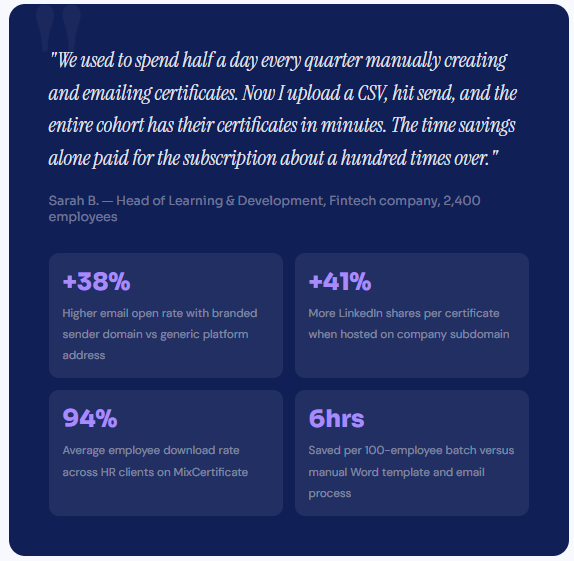
What changes when recognition actually lands well
What changes when recognition actually lands well
A certificate that arrives in a polished email from your company’s address, opens on your branded domain, and includes a verifiable QR code is a fundamentally different experience than a PDF from a generic platform.
- Higher open and download rates compared to generic platform-sent certificates
- More LinkedIn shares because employees feel proud to display branded credentials publicly
- Compliance completion rates improve when employees receive a verifiable certificate as the reward
- Recruiter and peer verification activity visible in analytics, validating the real-world value of your credentials
- HR team saves hours per recognition cycle versus manual PDF-and-email workflows
- Employer brand visibility grows organically every time an employee shares their certificate on social media
+38%
Higher email open rate with branded sender domain
+41%
More LinkedIn shares per certificate issued
94%
Average employee download rate across HR
6hrs
Saved per 100-employee batch vs manual process
Built for how HR teams actually work
Every feature was designed around the workflows HR and People teams deal with every recognition cycle without requiring IT involvement, design skills, or spare hours.
Bulk Issue in Under 3 Minutes
Upload your employee list as a CSV and send personalised certificates to every person in one click. A cohort of 500 takes no longer than a cohort of 5.
Personalised to Every Employee
Name, department, location, manager, award category, date, and any other field from your CSV appears on each certificate automatically. No manual editing per employee.
Engagement Analytics
See who downloaded, who shared on LinkedIn, and where QR scans came from. Know which recognition programmes drive the highest employee engagement.
Expiry Dates for Mandatory Training
Set annual renewal dates on safety, GDPR, and compliance certificates. The QR code automatically returns an expired status when recertification is overdue.
Grant Reporting Exports
Export full delivery reports in CSV and PDF with recipient names, programme details, issue dates, and QR scan logs ready to attach to your funder submission.
QR Verification for Compliance
Every certificate includes a dynamic QR code. Auditors, regulators, and recruiters verify authenticity instantly without contacting HR directly.
Easy Process
Certificate Hosting: Automatic & Effortless
From generation to permanent hosting in milliseconds
Step 1: Generate Certificates
Create certificates through our platform using bulk upload, templates, or API integration. Design once, generate thousands.
Step 2: Automatic Cloud Upload
The moment a certificate is generated, it’s automatically uploaded to secure, redundant cloud storage across multiple geographic regions.
Step 3: Unique URL Assignment
Each certificate receives a permanent, unique URL on your custom domain: yourschool.edu/cert/[UNIQUE-ID]
Step 4: Global Distribution
Certificate URLs become accessible worldwide through our global CDN. Available from 200+ edge locations for fast loading anywhere.
Step 5: Permanent Hosting
Certificates remain hosted permanently with 99.9% uptime guarantee. No expiration dates. No renewal fees. Hosted forever.

Integrations
Works with the tools your team already uses
Export a participant list from your existing systems and import it into MixCertificate in seconds. No complex IT project required. If you can send a spreadsheet, you can issue certificates.
Teachable
Export student completions and import directly. Or automate via Zapier to trigger on course completion.
Thinkific
Download Thinkific completion reports and import directly. Works with all course types and membership levels.
Moodle / Canvas
Export grade books and completion records from institutional LMS platforms and use them as your import file.
Zapier / API
Connect any tool in your stack. Trigger certificate issuance automatically when a learner is marked complete.
Add a certificate to your next campaign and watch what changes
Set up takes five minutes. Your next webinar, challenge, or product certification program can have certificates ready before it launches. No credit card needed to start.
# Education
Questions NGOs usually ask first
Frequently Asked Questions
No. We handle 100% of hosting infrastructure servers, CDN, SSL certificates, backups, security updates, scaling. You never touch technical infrastructure.
We support files up to 50MB per certificate. Our CDN optimizes delivery for fast loading even with large files. We r
Yes. Certificates can be hosted on your custom domain or subdomain: certificates.yourschool.edu or credentials.yourcompany.com. We handle all DNS and SSL certificate configuration.
Our multi-region architecture ensures certificates remain accessible even if one AWS region goes down. Automatic failover to backup regions maintains 99.9% uptime guarantee.
Yes. You can set certificates to require authentication before viewing. Perfect for internal documents or sensitive credentials that shouldn’t be public.
Recipients simply click the URL in their email or type it into any browser. No app downloads, no account creation, no login required. Works on any device instantly.