QR Codes That Work Forever, Not Just Today
Every certificate MixCertificate generates includes a dynamic QR code baked right in. Anyone can scan it, see the certificate is real, and you can update where it points at any time without reprinting a thing.

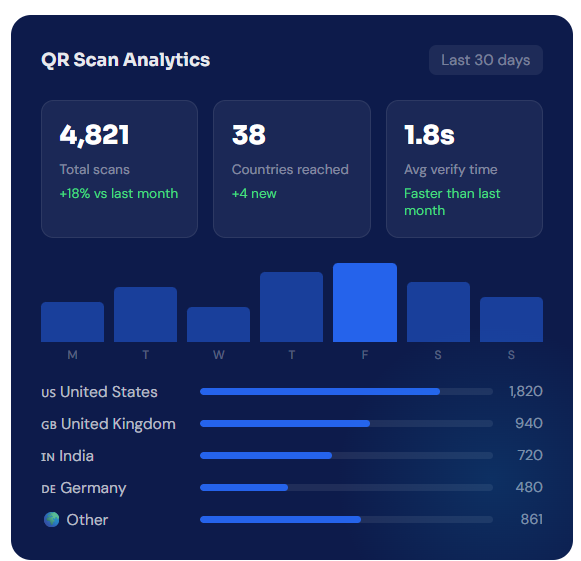
Scan Analytics
Know exactly who is verifying your certificates
Most verification systems tell you a certificate is valid or not. MixCertificate goes further. Every scan is logged so you can see when employers, clients, or institutions are checking credentials in real time.
Dynamic vs Static
Most QR codes are a dead end. These are not.
Static QR codes point to one URL forever. If anything changes, the QR code is useless. Dynamic QR codes let you update the destination any time, track who scans them, and stay useful for years.
- Static QR Code
Printed once, stuck forever
A static QR code encodes the URL directly into the pattern. Change the URL and you need a new QR code, which means reprinting every certificate that already exists.
- URL cannot be changed after printing
- No scan tracking or analytics
- Broken if the destination page moves
- No way to verify authenticity on scan
- Cannot expire or deactivate on demand
- MixCertificate Dynamic QR
Smart, updatable, and tracked
MixCertificate QR codes point to a short redirect URL. You control where that redirects, when it expires, and you see every scan in real time without touching the certificate itself.
- Change the redirect destination any time
- Full scan analytics with location and device data
- Instant verification page on every scan
- Deactivate a certificate remotely if needed
- Set expiry dates for time-limited certificates
Everything you need from a QR verification system
Built for organizations that issue certificates regularly and need verification to work reliably every time.
Editable Redirect URL
Change where the QR code points at any time from your dashboard. If your verification page URL changes, update it once and every existing certificate updates with it.
Real Time Scan Tracking
See every scan as it happens. Know exactly when a certificate was verified, what city the scan came from, and whether it was scanned on a phone or a desktop.
Tamper-Evident Verification
The verification page shows the original certificate details pulled directly from your records. Anyone who edits a PDF cannot fool the QR scan result.
Expiry Date Control
Set certificates to expire on a specific date. After that date, the scan returns a clear "this certificate has expired" message instead of a valid result.
Branded QR Styling
Add your logo, match your brand colors, and write a custom message so the email looks like it came from you, not a generic platform.
Send Across Time Zones
Schedule emails to go out at the right local time for each recipient, or pick a single send time that works for your whole list.
Easy Process
Certificate Hosting: Automatic & Effortless
From generation to permanent hosting in milliseconds
Step 1: Generate Certificates
Create certificates through our platform using bulk upload, templates, or API integration. Design once, generate thousands.
Step 2: Automatic Cloud Upload
The moment a certificate is generated, it’s automatically uploaded to secure, redundant cloud storage across multiple geographic regions.
Step 3: Unique URL Assignment
Each certificate receives a permanent, unique URL on your custom domain: yourschool.edu/cert/[UNIQUE-ID]
Step 4: Global Distribution
Certificate URLs become accessible worldwide through our global CDN. Available from 200+ edge locations for fast loading anywhere.
Step 5: Permanent Hosting
Certificates remain hosted permanently with 99.9% uptime guarantee. No expiration dates. No renewal fees. Hosted forever.

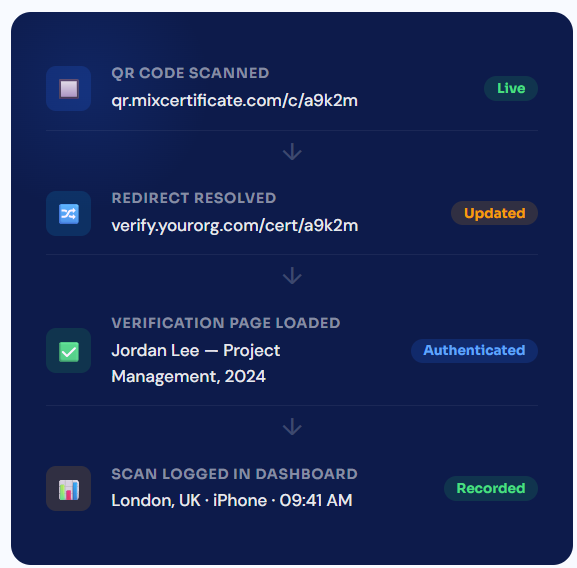
Redirect Control
Change the destination without touching the certificate
Your verification URL will eventually change. A new domain, a redesigned page, a new system. With static QR codes, that means every certificate ever issued becomes useless. With MixCertificate, you update one setting and all existing certificates follow.
Add QR verification to every certificate you issue
Takes about three minutes to set up. Every certificate you generate will include a dynamic QR code automatically from day one.
#Email Sending
Questions people usually ask first
Frequently Asked Questions
Yes. You can update the redirect destination at any time from your dashboard and the change applies to all existing QR codes instantly. No reprints needed.
Yes. The QR code is embedded as an image in the certificate, so it works whether the certificate is on screen or printed on paper. Any phone camera can scan it.
No. We handle 100% of hosting infrastructure servers, CDN, SSL certificates, backups, security updates, scaling. You never touch technical infrastructure.
We support files up to 50MB per certificate. Our CDN optimizes delivery for fast loading even with large files. We r
Yes. Certificates can be hosted on your custom domain or subdomain: certificates.yourschool.edu or credentials.yourcompany.com. We handle all DNS and SSL certificate configuration.
They land on a verification page that shows the certificate details, the recipient’s name, the issuing organization, and the issue date. Everything is pulled directly from your records.
Yes. Every QR code is unique to its certificate so the scan log in your dashboard shows you exactly which recipient’s certificate was verified and when.
Our multi-region architecture ensures certificates remain accessible even if one AWS region goes down. Automatic failover to backup regions maintains 99.9% uptime guarantee.
Yes. You can set certificates to require authentication before viewing. Perfect for internal documents or sensitive credentials that shouldn’t be public.
Recipients simply click the URL in their email or type it into any browser. No app downloads, no account creation, no login required. Works on any device instantly.