Make Every Employee Feel Genuinely Recognised, at Scale
From onboarding completions and service milestones to training badges and performance awards, MixCertificate helps HR and People teams issue branded certificates that employees are proud to keep and share.

Employee Experience
Recognition that employees share, not just save
A certificate people are proud of is a certificate they share. When employees post their recognition on LinkedIn, your organisation’s name goes with it. MixCertificate turns internal recognition into external visibility for your employer brand.
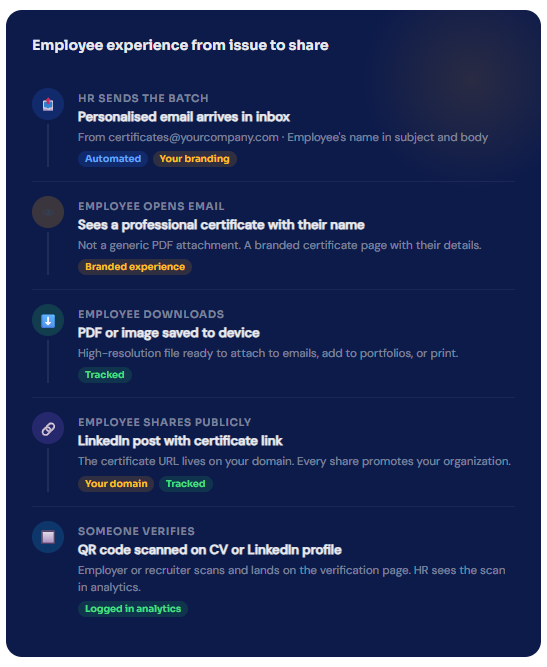
- Certificate arrives in the employee's inbox from your organisation's email address, not a platform
- Professional design with the employee's name, department, date, and award details personalised automatically
- One-click download in PDF and image formats so employees can use it anywhere
- Shareable link on your custom subdomain so every public share reinforces your employer brand
- QR code on every certificate so the credential can be verified by anyone who receives a copy
HR Analytics
Report on recognition programme impact, not just activity
Programme Engagement Reports
See open rates, download rates, and sharing activity for every recognition batch. Identify which award types drive the highest employee engagement and which ones fall flat.
94% avg download rate across HR clients
Employer Brand Reach
Track how many times certificates are shared publicly and where in the world verification scans come from. Quantify the external visibility that recognition generates for your brand.
41% of employees share certificates on LinkedIn
Compliance Audit Trail
Every feature HR teams actually need
Not a generic certificate tool. MixCertificate is built around the workflows HR and People teams use every day.
Bulk Issue in Under 3 Minutes
Upload your employee list as a CSV and send personalised certificates to every single person in one click. A cohort of 500 takes no longer than a cohort of 5.
Personalised to Every Employee
Name, department, location, manager, award category, date, and any other field from your CSV appears on each certificate automatically. No manual editing per employee.
QR Verification on Every Certificate
Every certificate includes a dynamic QR code. Employees can put it on their CV or LinkedIn and anyone who scans it gets instant confirmation that the credential is real and who issued it.
Auto Follow-Up for Non-Openers
Set a follow-up rule and MixCertificate automatically resends to any employee who has not opened their certificate after a set number of days. No manual chasing from you.
Your Subdomain, Your Brand
Certificates live on certificates.yourcompany.com. Every share, every QR scan, every verification happens on your domain. Recognition that builds your employer brand, not ours.
Delivered From Your Email Address
Emails go out from [email protected] using your SMTP server. Employees recognise the sender before they open the email, which means higher open rates and more trust.
Easy Process
Certificate Hosting: Automatic & Effortless
From generation to permanent hosting in milliseconds
Step 1: Generate Certificates
Create certificates through our platform using bulk upload, templates, or API integration. Design once, generate thousands.
Step 2: Automatic Cloud Upload
The moment a certificate is generated, it’s automatically uploaded to secure, redundant cloud storage across multiple geographic regions.
Step 3: Unique URL Assignment
Each certificate receives a permanent, unique URL on your custom domain: yourschool.edu/cert/[UNIQUE-ID]
Step 4: Global Distribution
Certificate URLs become accessible worldwide through our global CDN. Available from 200+ edge locations for fast loading anywhere.
Step 5: Permanent Hosting
Certificates remain hosted permanently with 99.9% uptime guarantee. No expiration dates. No renewal fees. Hosted forever.

Business Impact
What happens when recognition actually lands well
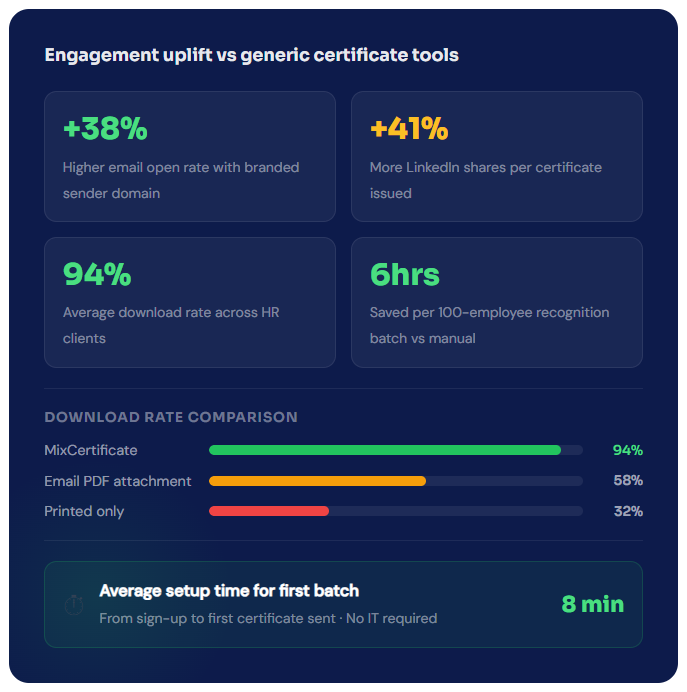
- Higher open and download rates compared to generic platform-sent certificates
- More LinkedIn shares per certificate because employees feel proud to show branded credentials
- Compliance completion rates improve when employees receive a certificate as a reward for completion
- Recruiter and peer verification activity visible in analytics, validating the real-world value of your credentials
- HR team saves hours per recognition cycle versus manual PDF-and-email workflows
Send your first recognition certificate in under 8 minutes
No IT involvement. No design skills needed. No credit card to get started. Just upload your employee list and go.
# HR & Employee Recognition
Questions people usually ask first
Frequently Asked Questions
Yes. You can upload your logo, set your brand colors, customise the certificate layout, and write the text that appears on each certificate. Your IT or design team does not need to be involved.
Yes. You can create multiple certificate templates and choose which one to use for each batch. Each template can have different design, text, and fields while using the same core brand elements.
Yes. MixCertificate is GDPR compliant. Employee data is encrypted at rest and in transit, never sold or shared with third parties, and can be deleted on request. A data processing agreement is available for enterprise customers.
No. We handle 100% of hosting infrastructure servers, CDN, SSL certificates, backups, security updates, scaling. You never touch technical infrastructure.
We support files up to 50MB per certificate. Our CDN optimizes delivery for fast loading even with large files. We r
Yes. Certificates can be hosted on your custom domain or subdomain: certificates.yourschool.edu or credentials.yourcompany.com. We handle all DNS and SSL certificate configuration.
At minimum, name and email address. You can also include department, location, job title, manager name, award category, date, and any other field you want to appear on the certificate or in the email.
Each certificate has a unique URL that works as a share link. Employees can copy that link and add it to their LinkedIn profile under licences and certifications. The QR code also works as a share mechanism on printed or digital copies.
Yes. You can set an expiry date on any certificate. When the date passes, the QR scan returns an “expired” status. This is useful for annual compliance training that needs to be renewed each year.
Our multi-region architecture ensures certificates remain accessible even if one AWS region goes down. Automatic failover to backup regions maintains 99.9% uptime guarantee.
Yes. You can set certificates to require authentication before viewing. Perfect for internal documents or sensitive credentials that shouldn’t be public.
Recipients simply click the URL in their email or type it into any browser. No app downloads, no account creation, no login required. Works on any device instantly.