Issue Certificates Directly From Your Google Sheet
Turn any Google Sheet into a live certificate engine. Add a row, mark a column, or run a batch — MixCertificate reads your sheet, personalises every certificate with the data from each row, and sends to every recipient automatically. No CSV exports. No platform switching. No manual work.
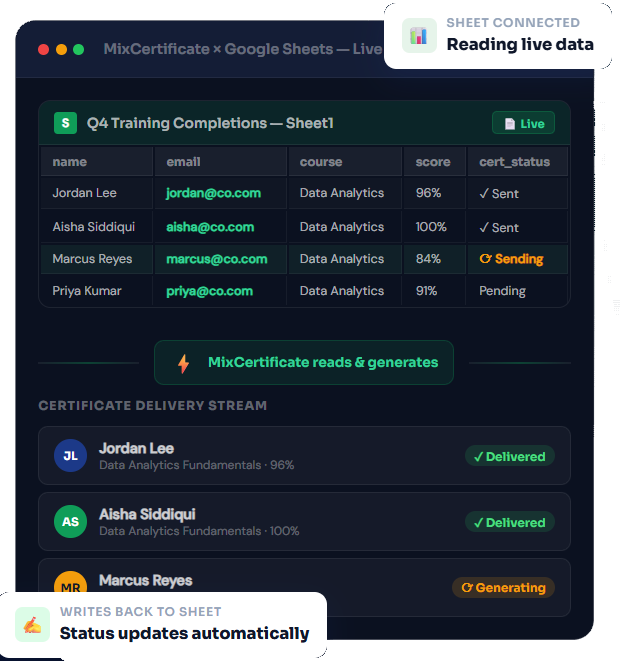
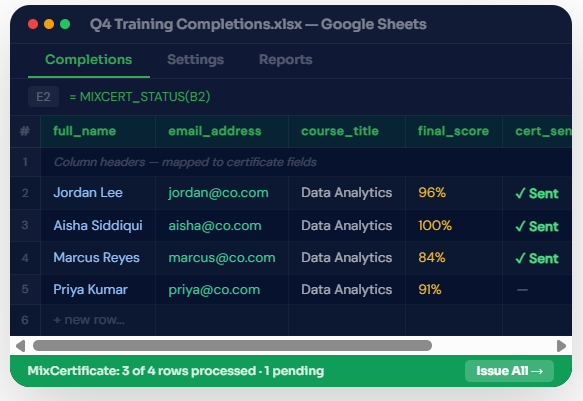
Your Sheet, Your Column Names
Map any column to any certificate field in under a minute
You should not have to rename columns, reformat dates, or restructure your sheet to fit the tool. MixCertificate reads your sheet as it is any column name, any layout and lets you map each column to a certificate field in a simple point-and-click interface. After setup, the mapping is saved and reused every time you run the integration.
- Any column name works full_name, FirstName, Name, participant MixCertificate maps it to the right field
- MixCertificate writes the certificate URL and delivery status back to dedicated columns in your sheet automatically
- Skip rows conditionally only issue certificates to rows where a specific column contains a value or meets a condition
- Multi-sheet support map different tabs in the same spreadsheet to different certificate templates for multi-cohort workflows
- Save your mapping once and it applies automatically every time you run the integration from the same sheet
Trigger Modes
Three ways to control when certificates get sent
Choose how MixCertificate reads your sheet and when it generates certificates from fully manual to fully automatic, depending on your workflow.
Automatic Row Trigger
MixCertificate watches your sheet for changes. The moment a new row is added, or a specific column value changes to a trigger condition you define, a certificate is generated and sent to that recipient automatically. No button to press, no batch to run.
Manual Batch Send
Review your sheet, confirm which rows should receive certificates, and click Issue Certificates from your MixCertificate dashboard. MixCertificate processes all rows that meet your filter conditions and sends the full batch in one go. Full control, zero manual work per row.
Scheduled Sync
Set MixCertificate to check your sheet on a schedule daily, weekly, or at a specific time. Any rows that have been added or updated since the last sync and meet your trigger conditions receive certificates automatically at the scheduled time.

Two-Way Sync
MixCertificate writes results back to your sheet automatically
Most integrations are one-directional you push data to the tool and nothing comes back. MixCertificate writes the certificate delivery status, the hosted URL, the issue date, and any errors back to designated columns in your sheet the moment they happen. Your Google Sheet becomes the single source of truth for your entire certificate programme.
- Certificate URL written to your sheet the moment the hosted page is generated
- Delivery status (Sent, Opened, Failed) updated in real time as each email is processed
- Issue date and time stamped back to your sheet automatically on generation
- Error reasons written back for failed rows so you can fix them without leaving Sheets
- QR scan count updated in your sheet whenever a verification scan happens on a hosted certificate
Everything included in the Google Sheets integration
Every feature in the integration is available on all MixCertificate plans. There is no premium tier required to unlock Sheets connectivity.
Live Sheet Reading
MixCertificate reads your sheet directly via the Google Sheets API. No CSV exports, no file uploads, no copy-paste. Your data stays in Sheets and MixCertificate reads it where it lives.
Automatic Write-Back
Certificate URLs, delivery statuses, issue dates, and verification counts are written back to your sheet automatically. Your sheet remains the single source of truth for your entire certificate programme.
Row-Level Triggers
Issue a certificate the moment a specific column in a row changes to a trigger value. No manual batch needed. A new completion in your sheet triggers a certificate automatically.
Scheduled Syncs
Set MixCertificate to check your sheet daily, weekly, or on any custom schedule. New rows that meet your criteria receive certificates at the scheduled time without any manual action.
Multi-Sheet and Multi-Tab Support
Connect multiple spreadsheets and multiple tabs to different certificate templates. Manage separate programmes HR completions, event attendance, NGO training from one MixCertificate account.
Row-Level Filtering
Only issue certificates to rows where a condition is met. Filter by score threshold, status column value, date range, or any other column without modifying your sheet or deleting rows.
Start tracking what happens after every certificate you send
Analytics are on by default the moment you issue your first certificate. Nothing to set up.
#Google Sheets
Questions people usually ask first
Frequently Asked Questions
No. MixCertificate connects directly to your Google Sheet via the Google Sheets API and reads your data live. There is no export, no file upload, and no manual transfer of data between platforms at any point.
MixCertificate requests read access to read your sheet data and write access to update designated columns with certificate status and URLs. You choose which columns it writes to during setup. MixCertificate never modifies your existing data rows — it only writes to the output columns you configure.
Yes. You can connect as many spreadsheets and tabs as you need. Each connection has its own column mapping, trigger mode, and certificate template. Different programmes can use different sheets and different templates, all managed from one dashboard.
No. We handle 100% of hosting infrastructure servers, CDN, SSL certificates, backups, security updates, scaling. You never touch technical infrastructure.
We support files up to 50MB per certificate. Our CDN optimizes delivery for fast loading even with large files. We r
Yes. Certificates can be hosted on your custom domain or subdomain: certificates.yourschool.edu or credentials.yourcompany.com. We handle all DNS and SSL certificate configuration.
MixCertificate validates each row before generating a certificate. If a required field like the email address is missing or invalid, that row is skipped and the error reason is written back to the error column in your sheet if you have that write-back option enabled. Other valid rows in the same batch are not affected.
Yes. Google Forms automatically writes responses into a connected Google Sheet. Connect MixCertificate to that responses sheet with an automatic row trigger, and every new form submission generates and sends a certificate to the respondent without any manual intervention.
Yes. The Google Sheets integration is available on all plans including the free plan. There is no premium tier required to connect a sheet or use manual batch mode. Automatic row triggers and scheduled syncs require a paid plan, but the manual connection and import works on free.
Our multi-region architecture ensures certificates remain accessible even if one AWS region goes down. Automatic failover to backup regions maintains 99.9% uptime guarantee.
Yes. You can set certificates to require authentication before viewing. Perfect for internal documents or sensitive credentials that shouldn’t be public.
Recipients simply click the URL in their email or type it into any browser. No app downloads, no account creation, no login required. Works on any device instantly.