Send Every Attendee Their Certificate Before the Event Ends

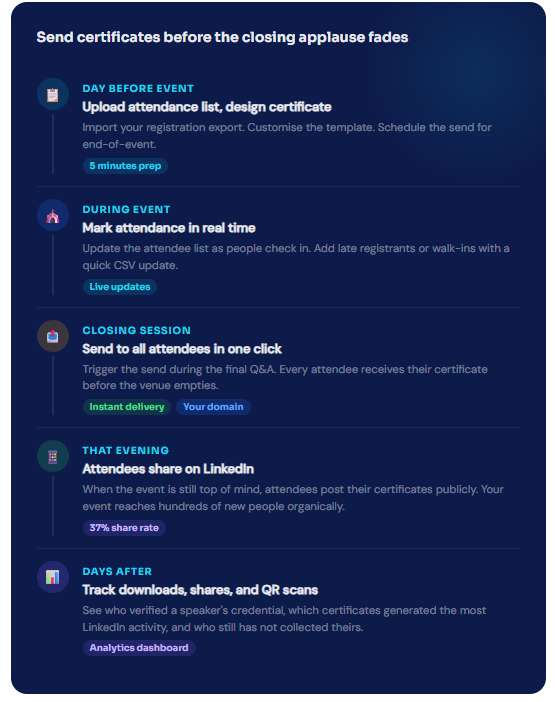
Send while the event is still in the room
A certificate that arrives the same day as the event gets shared. A certificate that arrives two weeks later gets filed away or deleted. MixCertificate is fast enough to send to an entire conference while the closing remarks are still happening, which is when attendees are most likely to share publicly.
- Send to 1,000 attendees in under two minutes from a single click
- Schedule the send in advance so it fires automatically at a set time without you being present
- Add walk-in attendees to the list right up until you hit send, no need to redo the whole batch
- Certificates arrive from your event's email address, not a generic platform address
- Follow up automatically with anyone who did not open their certificate within 48 hours
Works With Your Event Stack
Export from your event platform and import in seconds
Eventbrite
Zoom Webinars
Hopin / Airmeet
Every feature your event workflow needs
Send to 1,000 Attendees in 2 Minutes
Upload your attendance export and send personalised certificates to every single attendee with one click. Large conferences take no longer than small workshops.
Multiple Certificate Types per Event
Run separate certificate batches for speakers, general attendees, workshop participants, and award winners from a single event dashboard. Each type has its own design and recipient list.
QR Verification for Every Credential
Employers and recruiters scan the QR code and land on your verification page. The certificate details are confirmed without them needing to contact you directly.
Certificates on Your Event Domain
Certificates live on certificates.yourevent.com. Every share and every QR scan drives traffic back to your event brand, not to a third-party platform your attendees have never heard of.
Schedule the Send in Advance
Set an exact time for certificates to go out and MixCertificate handles the delivery. Schedule it for the final session slot so attendees receive it without you being at a keyboard during the event.
Post-Event Reach Analytics
See how many certificates were shared on LinkedIn, track QR scan activity from employers and event bookers, and measure the post-event reach your certificates generated for the next planning cycle.
Easy Process
Certificate Hosting: Automatic & Effortless
From generation to permanent hosting in milliseconds
Step 1: Generate Certificates
Create certificates through our platform using bulk upload, templates, or API integration. Design once, generate thousands.
Step 2: Automatic Cloud Upload
The moment a certificate is generated, it’s automatically uploaded to secure, redundant cloud storage across multiple geographic regions.
Step 3: Unique URL Assignment
Each certificate receives a permanent, unique URL on your custom domain: yourschool.edu/cert/[UNIQUE-ID]
Step 4: Global Distribution
Certificate URLs become accessible worldwide through our global CDN. Available from 200+ edge locations for fast loading anywhere.
Step 5: Permanent Hosting
Certificates remain hosted permanently with 99.9% uptime guarantee. No expiration dates. No renewal fees. Hosted forever.

Give speakers a credential worth adding to their profile
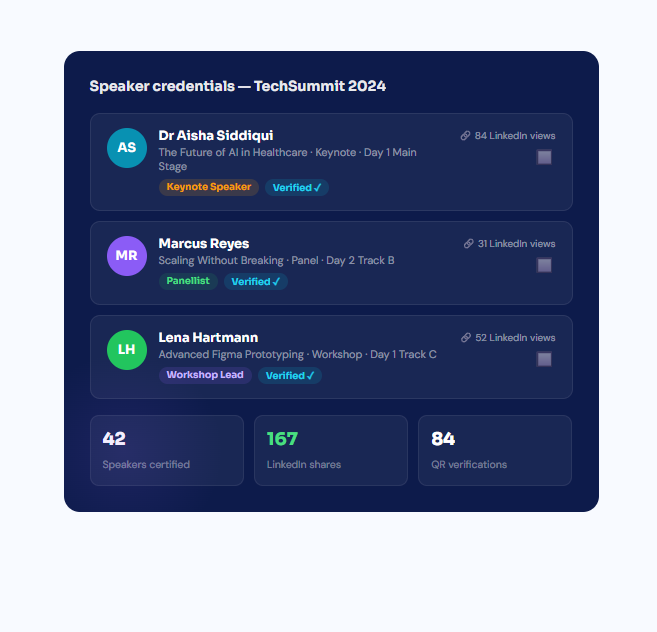
Speakers invest time preparing for your event. A professional credential they can show publicly is a meaningful way to acknowledge that. It also benefits your event: when speakers add the credential to their LinkedIn profile, their audience discovers your conference.
- Separate certificate type for each speaker role keynote, panellist, workshop facilitator, moderator
- Talk title, session date, and track name included on the certificate automatically from your speaker list
- QR code allows event bookers and recruiters to verify the speaking credential instantly
- Speaker credentials live on your event subdomain so every verification drives traffic back to you
- Send speaker certificates independently from attendee certificates on a different schedule if needed
Measure the reach your certificates generate after the event closes
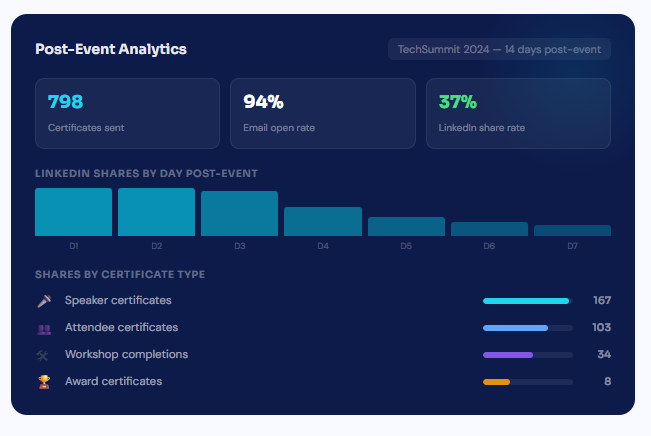
The event ends but the certificate keeps working. MixCertificate tracks every download, share, and QR verification so you can quantify the ongoing visibility your event generates through participants sharing their credentials publicly.
- See LinkedIn share activity day by day in the two weeks after the event while momentum is still building
- Track which certificate type drives the most sharing (speakers almost always outperform general attendees)
- Monitor QR scan activity to see when employers and event bookers are verifying speaker credentials
- Follow up with attendees who never opened their certificate and offer a resend with a personal note
- Export the full analytics report to include post-event reach data in your sponsorship or board pack
Send your next event's certificates on the same day
Set up takes five minutes. Your attendees get their certificates while the event is still fresh. No credit card needed to start.
# Event & Webinars
Questions event organisers usually ask first
Frequently Asked Questions
No. We handle 100% of hosting infrastructure servers, CDN, SSL certificates, backups, security updates, scaling. You never touch technical infrastructure.
We support files up to 50MB per certificate. Our CDN optimizes delivery for fast loading even with large files. We r
Yes. Certificates can be hosted on your custom domain or subdomain: certificates.yourschool.edu or credentials.yourcompany.com. We handle all DNS and SSL certificate configuration.
Our multi-region architecture ensures certificates remain accessible even if one AWS region goes down. Automatic failover to backup regions maintains 99.9% uptime guarantee.
Yes. You can set certificates to require authentication before viewing. Perfect for internal documents or sensitive credentials that shouldn’t be public.
Recipients simply click the URL in their email or type it into any browser. No app downloads, no account creation, no login required. Works on any device instantly.