Certificates That Make Learners Proud to Share What They Earned
From solo instructors on Teachable to university continuing education departments, MixCertificate helps course providers issue branded, verifiable certificates that learners actually use on their LinkedIn profiles, CVs, and job applications.

Student Experience
A certificate worth putting on a CV
Most course completion certificates get ignored because they look generic, cannot be verified, and live in a PDF buried in a downloads folder. MixCertificate issues credentials that students actively choose to share because they look legitimate, live on a real URL, and prove their skills to anyone who checks.
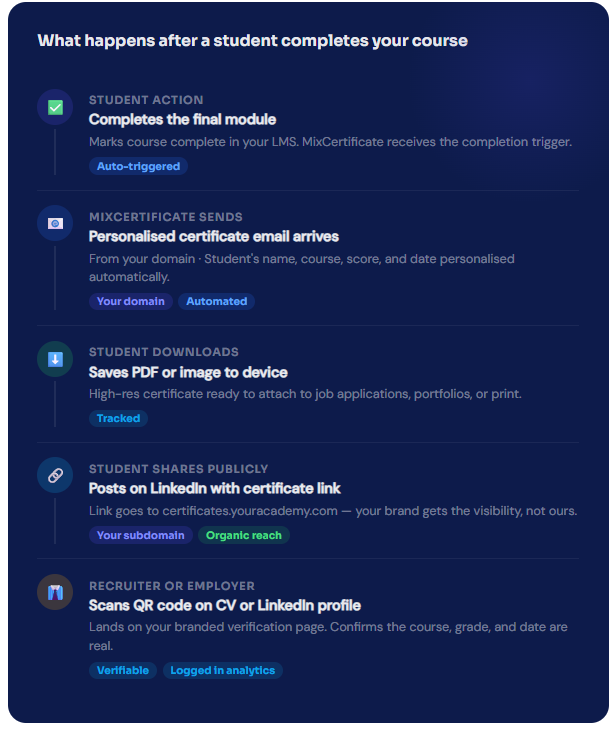
- Certificate arrives immediately after completion, not days later when the excitement has faded
- Student's name, course title, score, completion date, and skills all personalised automatically
- Shareable URL on your custom subdomain so every LinkedIn share promotes your academy
- QR code lets employers verify the credential without contacting you
- You see every download, share, and QR verification in your analytics dashboard
Works With Your Teaching Platform
Export from any platform and import to MixCertificate in seconds
Teachable
Thinkific
Moodle / Canvas
Export grade books and completion records from institutional LMS platforms and use them
Every feature course creators and educators actually need
Not a generic document tool. MixCertificate is built around the workflows educators deal with every time a cohort finishes a course.
Issue to an Entire Cohort at Once
Upload a completion list and send personalised certificates to every student in a single click. A cohort of 500 takes the same time as a cohort of 5.
Student Details Personalised Automatically
Name, course title, score, completion date, skills, and instructor name are all pulled from your CSV and placed on each certificate without any manual editing.
Verifiable QR Code on Every Certificate
Employers and recruiters scan the QR code and land on your verification page. The certificate details are confirmed without them needing to contact you directly.
Your Academy on Your Domain
Certificates live on certificates.youracademy.com. Every LinkedIn share, every QR scan, and every verification strengthens your academy's brand, not a third-party platform's.
See Who Shares and Who Verifies
Analytics show you which courses produce the most LinkedIn shares, which certificates get verified by employers, and which students still have not downloaded their credential.
Expiry Dates for Time-Limited Credentials
For CPD hours, annual certifications, or skills that require renewal, set an expiry date. The certificate shows a valid-until date and the QR code returns an expired status after that date.
Easy Process
Certificate Hosting: Automatic & Effortless
From generation to permanent hosting in milliseconds
Step 1: Generate Certificates
Create certificates through our platform using bulk upload, templates, or API integration. Design once, generate thousands.
Step 2: Automatic Cloud Upload
The moment a certificate is generated, it’s automatically uploaded to secure, redundant cloud storage across multiple geographic regions.
Step 3: Unique URL Assignment
Each certificate receives a permanent, unique URL on your custom domain: yourschool.edu/cert/[UNIQUE-ID]
Step 4: Global Distribution
Certificate URLs become accessible worldwide through our global CDN. Available from 200+ edge locations for fast loading anywhere.
Step 5: Permanent Hosting
Certificates remain hosted permanently with 99.9% uptime guarantee. No expiration dates. No renewal fees. Hosted forever.

Employer Brand for Educators
When students share their certificate, your course gets discovered
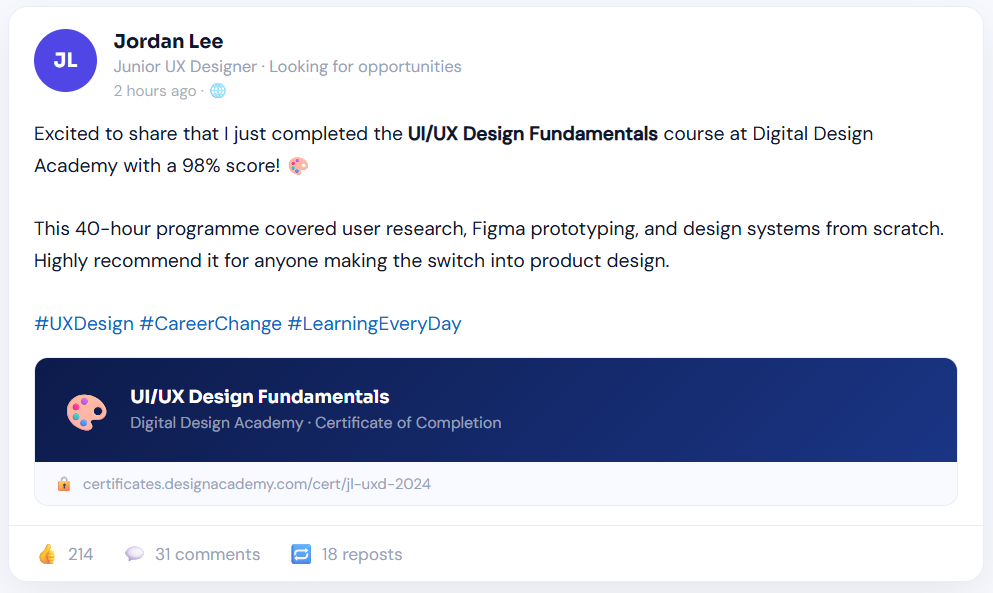
Every time a student posts their certificate on LinkedIn, they are advertising your course to their entire professional network. A certificate with your course name, your branding, and a real verification URL tells potential students that your programme is worth taking.
- 38% of students who receive a MixCertificate share it on LinkedIn within 7 days
- Certificate links on your custom subdomain send traffic back to your course page
- Professional design signals course quality before anyone clicks through to read the details
- Shareable link format works perfectly as an addition to LinkedIn's licences and certifications section
- Analytics show you how many times each certificate was shared and from which countries
Send your first recognition certificate in under 8 minutes
No IT involvement. No design skills needed. No credit card to get started. Just upload your employee list and go.
# Education & Courses
Questions people usually ask first
Frequently Asked Questions
No. We handle 100% of hosting infrastructure servers, CDN, SSL certificates, backups, security updates, scaling. You never touch technical infrastructure.
We support files up to 50MB per certificate. Our CDN optimizes delivery for fast loading even with large files. We r
Yes. Certificates can be hosted on your custom domain or subdomain: certificates.yourschool.edu or credentials.yourcompany.com. We handle all DNS and SSL certificate configuration.
Yes. The free plan lets you issue a set number of certificates per month at no cost. Solo instructors with smaller audiences get the same branded, verifiable certificates as large academies. You can scale up the plan as your student numbers grow.
Our multi-region architecture ensures certificates remain accessible even if one AWS region goes down. Automatic failover to backup regions maintains 99.9% uptime guarantee.
Yes. You can set certificates to require authentication before viewing. Perfect for internal documents or sensitive credentials that shouldn’t be public.
Recipients simply click the URL in their email or type it into any browser. No app downloads, no account creation, no login required. Works on any device instantly.