Every Certificate Gets Its Own Permanent URL on Your Domain
Every certificate MixCertificate generates is instantly hosted on a public page on your branded subdomain. Recipients get a shareable link they can put on LinkedIn, CVs, and portfolios. Anyone who clicks it lands on a professional verification page your branding, your domain, your credentials.

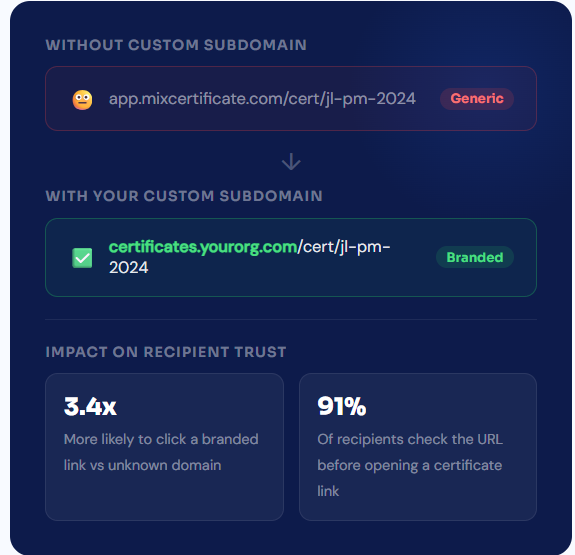
Your Domain, Not Ours
The URL recipients share is the one that matters
When a recipient posts their certificate on LinkedIn, the URL they share is the one their network sees. If that URL shows a third-party platform name, the credential feels borrowed. If it shows your organisation’s domain, the credential belongs to you. MixCertificate hosts every certificate on your branded subdomain from the moment it is generated.
- Every certificate gets a permanent URL on your subdomain automatically no manual publishing step
- Free SSL certificate provisioned automatically so every hosted page shows a padlock in the browser
- URLs never break or expire the page is live for as long as the certificate is valid
- Global CDN delivery so the hosted page loads fast regardless of where in the world the verifier is
- Custom path format available choose between auto-generated IDs or human-readable slugs you define
Infrastructure
Built for reliability, not for just today
A certificate URL shared five years from now needs to work just as reliably as one shared today. MixCertificate’s hosting infrastructure is designed around uptime, permanence, and global performance not around getting you started quickly and hoping for the best
- 99.99% uptime SLA on all hosted certificate pages
- Global CDN with edge locations in 40+ countries for fast load times worldwide
- Automatic SSL renewal so your certificates never show a security warning
- No storage limits every certificate you issue is hosted indefinitely at no extra cost
- Zero downtime when you update your subdomain or change your branding
Uptime guarantee
99.99% SLA on all certificate hosting backed by redundant infrastructure across multiple availability zone
Global CDN delivery
Edge locations in 40+ countries certificate pages load in under 200ms for visitors worldwide
Auto-renewing SSL
Free SSL certificates provisioned and renewed automatically no manual steps, no expiry warnings
Everything included with every hosted certificate
Certificate hosting is not an add-on. Every certificate generated through MixCertificate is hosted automatically with all of these features included from day one.
Custom Subdomain Hosting
All certificates live on certificates.yourorganisation.com. Set up with a single CNAME record. Every hosted page reinforces your brand, not a platform's.
Free SSL on Every Page
HTTPS is automatic. The moment your subdomain is configured, MixCertificate provisions a free SSL certificate and every hosted page loads securely with a green padlock.
Permanent URLs
A certificate URL never changes and never expires while the credential is active. Recipients can share it on their LinkedIn today and still have it work five years from now.
Global CDN Delivery
Hosted certificate pages load fast everywhere in the world. Your credentials perform the same whether the verifier is in London, Lagos, or Singapore.
Page Visit Analytics
Track how many times each hosted certificate page was visited, where visitors came from, and which certificates receive the most verification traffic.
Instant Revocation
Revoke any hosted certificate from your dashboard. The page immediately shows a revoked status. No need to chase down copies or contact recipients.
Easy Process
Certificate Hosting: Automatic & Effortless
From generation to permanent hosting in milliseconds
Step 1: Generate Certificates
Create certificates through our platform using bulk upload, templates, or API integration. Design once, generate thousands.
Step 2: Automatic Cloud Upload
The moment a certificate is generated, it’s automatically uploaded to secure, redundant cloud storage across multiple geographic regions.
Step 3: Unique URL Assignment
Each certificate receives a permanent, unique URL on your custom domain: yourschool.edu/cert/[UNIQUE-ID]
Step 4: Global Distribution
Certificate URLs become accessible worldwide through our global CDN. Available from 200+ edge locations for fast loading anywhere.
Step 5: Permanent Hosting
Certificates remain hosted permanently with 99.9% uptime guarantee. No expiration dates. No renewal fees. Hosted forever.

What Recipients Get
One DNS record. Five minutes. Done.
You do not need a developer to set this up. If you can log in to your domain registrar, you can add a CNAME record. MixCertificate detects it automatically and does the rest without any back and forth.
- Works with GoDaddy, Cloudflare, Namecheap, Google Domains, Route 53, and more
- MixCertificate detects the record and provisions SSL without manual steps
- Zero downtime migration: existing certificate links stay working during the switch
- Step-by-step setup guide available for every major registrar inside the dashboard
- Support team available if anything does not propagate as expected
Social Sharing
Every hosted certificate is built to be shared
A certificate that lives at a real URL gets shared. A PDF attached to an email gets filed away. When recipients post their hosted certificate on LinkedIn, the preview card shows your organisation’s name and the certificate details free visibility for your brand with every share.
- Open Graph meta tags on every hosted page so LinkedIn and Twitter show a rich preview card when the URL is shared
- One-click share buttons for LinkedIn, Twitter/X, and copy link built into every hosted certificate page
- LinkedIn certification format supported — recipients can add the URL directly to their licences and certifications section
- Analytics show you how many times each certificate page was visited via social shares versus direct links
Put your brand on every certificate you issue
Five minutes to set up. Free on every plan. No developer required.
#certificate Hosting
Questions people usually ask first
Frequently Asked Questions
Yes. You need access to the DNS settings for a domain you own. You are creating a subdomain like certificates.yourdomain.com, so the main domain needs to be yours.
Hosted pages stay live permanently while the certificate is active. There is no expiry on the hosting itself. If you set a certificate to expire, the page will show an expired status after that date, but the URL continues to work and the page remains accessible.
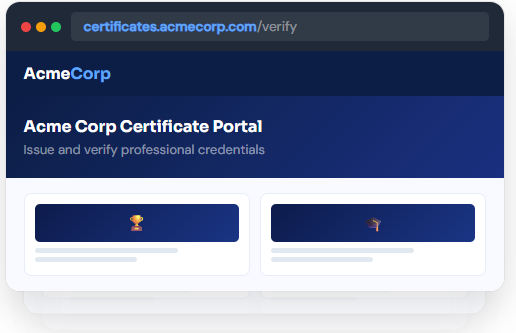
They see your organisation’s branded page your logo, colors, and navigation with the full certificate details including the recipient’s name, course or programme, issue date, and verification status. There are also download and share buttons so anyone can save or share the certificate directly from the page.
No. We handle 100% of hosting infrastructure servers, CDN, SSL certificates, backups, security updates, scaling. You never touch technical infrastructure.
We support files up to 50MB per certificate. Our CDN optimizes delivery for fast loading even with large files. We r
Yes. Certificates can be hosted on your custom domain or subdomain: certificates.yourschool.edu or credentials.yourcompany.com. We handle all DNS and SSL certificate configuration.
Yes. The hosted page carries your organisation’s branding automatically from your subdomain setup. You can also customise the page layout, add your organisation’s description, configure which information fields are shown, and set the color scheme to match your brand.
MixCertificate handles the migration automatically with zero downtime. If you update or change your subdomain, all existing certificate URLs redirect to the new domain instantly. Recipients with existing links do not experience any broken pages during or after the change.
No. Hosting is included for every certificate you issue with no storage limit. Every certificate in every batch is hosted automatically. There is no extra cost per hosted certificate and no threshold at which hosting fees apply.
Our multi-region architecture ensures certificates remain accessible even if one AWS region goes down. Automatic failover to backup regions maintains 99.9% uptime guarantee.
Yes. You can set certificates to require authentication before viewing. Perfect for internal documents or sensitive credentials that shouldn’t be public.
Recipients simply click the URL in their email or type it into any browser. No app downloads, no account creation, no login required. Works on any device instantly.