
If you manage corporate training programs, you already know the certificate part is often the most overlooked step. You run a great learning session, employees complete it, and then someone has to manually create 50 or 200 certificates in Word, export them as PDFs, and email them one by one.
That is a workflow problem, not a certificate problem.
The good news is that modern employee training certificate platforms have solved this. Some are standalone tools. Others are built into larger LMS platforms. And a few, like MixCertificate, are purpose-built for bulk certificate generation without the bloat of a full learning management system.
In this post, I am covering the top platforms worth considering in 2026, what each one does well, where each falls short, and how to pick the right one for your HR or L&D team.
What Makes a Good Employee Training Certificate Platform?
Before we get into the list, here is what I look for when evaluating any certificate platform for corporate use:
Bulk generation capability is the first thing I check. If a tool cannot generate 100 certificates in one click from a spreadsheet, it is not built for corporate training teams. It is built for individual creators.
Bulk Email Sending is one of the core features I look for. Sending certificates one by one takes hours, and that’s a big waste of time.
Custom branding matters too. Your certificates need to carry your company logo, color scheme, and authorized signature. Generic templates with no customization look unprofessional and reduce perceived value for employees.
Verification and authenticity features are becoming standard. QR codes, unique certificate IDs, and shareable credential links make certificates harder to fake and easier for employees to share on LinkedIn.
Integration with your existing tools saves hours. Whether that is your HR software, your LMS, or just Google Sheets, the platform should work with what you already use.
PDF and image export options are non-negotiable. Most HR teams need to email certificates as PDF attachments. Some need image files for LinkedIn posts or internal portals.
Top Employee Training Certificate Platforms in 2026
1. MixCertificate
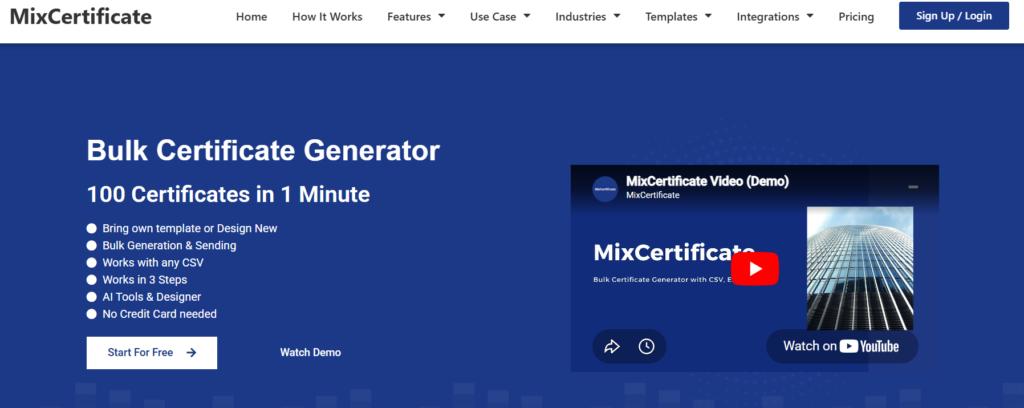
MixCertificate is a bulk certificate generator built specifically for teams that need to issue large volumes of training certificates quickly. Unlike LMS-bundled certificate tools, MixCertificate is a focused digital credential platform that does one thing well, credential issuing,sending and management.
You upload a spreadsheet with participant names and other custom fields, pick or build a certificate template, and generate hundreds of personalized certificates in one batch. Each certificate can be downloaded as a PDF or sent directly to participants.
What I like about it for corporate training use is that it handles variable data well. You can include training module names, completion dates, scores, and trainer names as dynamic fields without doing any manual editing.
For companies running professional development programs, this is valuable. Employees can add their certificate to their LinkedIn profile with one click, and the credential links back to a verification page.
It is a particularly good fit for HR teams running onboarding programs, compliance training, safety certifications, or skill-specific workshops where bulk output is the main need. If you are issuing 10 certificates a year, any tool will do. If you are issuing 500 or 5,000, MixCertificate is worth a serious look.
Best for: HR teams, corporate trainers, and L&D managers handling high-volume certificate issuance.
2. Canva (with CSV data merge)

Canva is not a certificate platform in the traditional sense, but many HR teams use it for certificate creation because the design flexibility is hard to beat.
Canva’s bulk create feature lets you upload a CSV and generate personalized certificates using template fields. It works reasonably well for smaller teams. You get full creative control over the design, and the output quality is excellent.
The problem for corporate training teams is the workflow. Canva’s bulk create is a design feature, not an HR workflow tool. You cannot easily send certificates directly to recipients. You have to download each one, organize the files, and distribute manually. At any volume above 50 participants, this becomes time-consuming.
Best for: Small teams with light volume who want maximum design flexibility and already use Canva.
3. Certifier

Certifier is a digital credential platform that goes beyond simple certificates. It supports open badge standards, which means the credentials employees earn are verifiable on LinkedIn and other platforms.
The platform has templates, customization options, and basic analytics showing how often a credential has been viewed or shared. It also integrates with tools like Zapier, so you can automate issuance when someone completes a course in your LMS.
The limitation is pricing. At higher volumes, Certifier gets expensive, and the bulk import tools are less intuitive than a pure bulk generation tool like MixCertificate. Certifier charges for every little feature via premium plans. Ie: custom domain or custom SMTP. MixCertificate has both on all plans.
Best for: Companies that want verifiable digital credentials and open badge compatibility.
4. Accredible

Accredible is one of the more established names in the digital credential space. It is used by major universities and professional certification bodies, but it also has a strong corporate training product.
The platform supports digital certificates and badges, and it has solid integrations with LMS platforms like Moodle, Canvas, and Teachable. You can automate certificate issuance based on course completion events.
Accredible’s analytics are a standout feature. You can see which credentials get shared most, which recipients engage with their certificates, and aggregate data across programs. For large organizations running multiple training tracks, this kind of visibility is genuinely useful.
The downside is complexity. Accredible is built for organizations running structured credential programs, and the setup can take time. If you just need to issue certificates after a one-day safety training, it may be more than you need.
Best for: Large enterprises with formal certification programs and LMS integrations already in place.
5. Visme

Visme is a visual communication platform that includes certificate templates as one of its many output types. Like Canva, it offers strong design control and a template library.
It has a data merge feature that allows bulk certificate generation from a spreadsheet, which puts it ahead of Canva for volume use cases. The platform also supports password protection and shareable links, which adds some basic security.
Visme’s weakness is that certificates are one feature among many in a general-purpose design platform. It does not have dedicated HR workflows, recipient management, or verification infrastructure. It is a good option if your organization already uses Visme for other content and wants to centralize tools.
Best for: Teams already on Visme who want to add certificate generation without a new tool.
6. BadgeCert
BadgeCert is a credential management platform focused on digital badges and certificates for professional development and continuing education contexts.
It supports open badge standards, allows organizations to issue certificates with verifiable metadata, and has tools for managing large recipient lists. The platform is used by associations, training providers, and corporate learning teams.
For HR teams running voluntary professional development programs, the badge-focused approach works well. Employees are more likely to share and display digital badges than traditional PDFs, which increases the visibility of your training programs internally and externally.
Best for: Companies focused on recognition-driven learning cultures and professional development programs.
How to Choose the Right Platform for Your Team
The right platform depends on three things: volume, workflow, and what happens after the certificate is issued.
If volume is your primary challenge, meaning you are generating hundreds or thousands of certificates per training cycle, you need a bulk generation tool like MixCertificate. Design platforms that happen to have bulk features will slow you down at scale.
If your goal is verifiable credentials that employees can share publicly, look at Certifier, Accredible, or BadgeCert. These platforms are built around credential authenticity and shareability.
If design flexibility is the priority and volume is low, Canva or Visme will give you the most creative control.
If you are running structured learning programs and want certificates tied directly to LMS completion events, Accredible’s integration options are worth the setup investment.
Why Bulk Certificate Generation Matters for Corporate Training
Most corporate training compliance requirements involve documentation. Regulatory audits, internal reviews, and HR records all depend on having clear proof of who completed what training and when.
Manual certificate creation introduces errors. Wrong names, wrong dates, inconsistent formatting. It also creates delays. Employees complete training and wait days or weeks to receive their certificates because someone on the HR team is building them one by one.
Bulk generation eliminates both problems. A single upload produces consistent, accurate certificates for every participant in minutes. The documentation is clean, the turnaround is fast, and the HR team can focus on higher-value work.
For organizations running compliance training at scale, like annual safety certifications, onboarding programs, or mandatory skills assessments, this is not a convenience feature. It is an operational requirement.
Final Recommendation
If your organization has more complex credentialing needs, such as verifiable open badges or LMS integration, Certifier or Accredible are worth evaluating alongside it.
For most corporate HR and L&D teams dealing with volume, MixCertificate is the most direct solution. It is built specifically for the bulk generation use case, has clean data import functionality, and does not require you to adopt a full LMS or credential management platform to get the job done.
The common mistake is trying to solve a volume problem with a design tool. When you need to issue 300 certificates after a company-wide compliance training, you need a workflow, not just a template.
Also Read Related Blog :





4 Responses