Credentials That Prove Your Mission Is Working
From volunteer recognition to grant reporting, MixCertificate helps non-profits issue verified digital credentials that demonstrate programme impact, retain volunteers, and satisfy funders without adding hours of admin to already stretched teams.

The Non-Profit Credential Problem
Recognition is one of the most powerful tools NGOs have. It is also the most overlooked.
Non-profit teams are stretched. Certificate issuance feels like a nice-to-have, so it gets done badly or not at all. But the cost of not doing it well shows up in volunteer retention, programme credibility, and funder confidence.
Volunteers leave because they do not feel valued
Meaningful recognition is one of the top factors in volunteer retention. A professional certificate for 100 hours of service costs nothing to issue and makes a significant difference to whether that volunteer returns next year.
Training credentials cannot be verified
Staff safeguarding certificates issued as plain PDFs cannot be authenticated. When auditors or partner organisations ask for proof of training, there is no way to confirm the certificate is genuine without contacting the issuing NGO directly.
Measurable Outcomes
What NGOs actually report after switching to MixCertificate
- Learner download rates of 91% on average, up from 58% with email PDF attachments
- 38% of learners share their certificate on LinkedIn within 7 days of receiving it
- Course enrolment rates rise by an average of 34% when certificate is promised on sign-up page
- Employer verification requests drop to near zero because QR scanning replaces phone calls
- Certificate issuance time falls from hours of manual work to under three minutes per cohort
- LinkedIn shares from graduates drive measurable new enrolment referrals at no extra cost
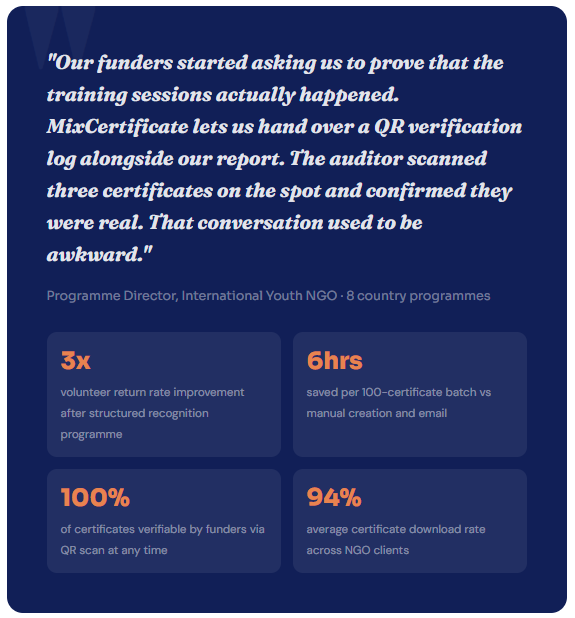
3x
Higher volunteer return rate when structured recognition certificates are part of the programme
94%
Average certificate download rate volunteers and participants actively collect their credentials
100%
Of issued certificates verifiable by funders and auditors via QR scan at any time
−97%
Time spent on certificate issuance compared to the manual Word-and-email process
Built for lean teams with big missions
Every feature was designed to reduce the time non-profit teams spend on certificate administration and increase the credibility of every credential they issue.
Bulk Issue to Entire Cohorts
Upload a participant list and send personalised certificates to every volunteer, trainee, or programme graduate at once. Hundreds issued in seconds, not hours.
QR Verification for Auditors
Every certificate carries a QR code that auditors, funders, and partner organisations can scan for instant authenticity confirmation. No more phone calls to verify credentials.
Expiry Dates for Compliance
Set annual renewal dates on safeguarding, first aid, and compliance certificates. The QR code automatically returns an expired status when recertification is due.
Your NGO on Your Domain
Certificates live on certificates.yourorganisation.org. Every share, QR scan, and verification reinforces your organisation's authority, not a third-party tool's.
Grant Reporting Exports
Export full delivery reports in CSV and PDF with recipient names, programme details, issue dates, and QR scan logs ready to attach to your funder submission.
Multi-Language Support
Issue certificates in any language for international programmes. Each template can be set to the appropriate language for the participant cohort receiving it.
Easy Process
Certificate Hosting: Automatic & Effortless
From generation to permanent hosting in milliseconds
Step 1: Generate Certificates
Create certificates through our platform using bulk upload, templates, or API integration. Design once, generate thousands.
Step 2: Automatic Cloud Upload
The moment a certificate is generated, it’s automatically uploaded to secure, redundant cloud storage across multiple geographic regions.
Step 3: Unique URL Assignment
Each certificate receives a permanent, unique URL on your custom domain: yourschool.edu/cert/[UNIQUE-ID]
Step 4: Global Distribution
Certificate URLs become accessible worldwide through our global CDN. Available from 200+ edge locations for fast loading anywhere.
Step 5: Permanent Hosting
Certificates remain hosted permanently with 99.9% uptime guarantee. No expiration dates. No renewal fees. Hosted forever.

Integrations
Works with the tools your team already uses
Export a participant list from your existing systems and import it into MixCertificate in seconds. No complex IT project required. If you can send a spreadsheet, you can issue certificates.
Teachable
Export student completions and import directly. Or automate via Zapier to trigger on course completion.
Thinkific
Download Thinkific completion reports and import directly. Works with all course types and membership levels.
Moodle / Canvas
Export grade books and completion records from institutional LMS platforms and use them as your import file.
Zapier / API
Connect any tool in your stack. Trigger certificate issuance automatically when a learner is marked complete.
Add a certificate to your next campaign and watch what changes
Set up takes five minutes. Your next webinar, challenge, or product certification program can have certificates ready before it launches. No credit card needed to start.
# Education
Questions NGOs usually ask first
Frequently Asked Questions
No. We handle 100% of hosting infrastructure servers, CDN, SSL certificates, backups, security updates, scaling. You never touch technical infrastructure.
We support files up to 50MB per certificate. Our CDN optimizes delivery for fast loading even with large files. We r
Yes. Certificates can be hosted on your custom domain or subdomain: certificates.yourschool.edu or credentials.yourcompany.com. We handle all DNS and SSL certificate configuration.
Our multi-region architecture ensures certificates remain accessible even if one AWS region goes down. Automatic failover to backup regions maintains 99.9% uptime guarantee.
Yes. You can set certificates to require authentication before viewing. Perfect for internal documents or sensitive credentials that shouldn’t be public.
Recipients simply click the URL in their email or type it into any browser. No app downloads, no account creation, no login required. Works on any device instantly.