Emails That Come From You, Not Us
Connect your own mail server and every certificate email goes out from your address, your domain, and your sending reputation. Recipients see your name in the From field. Not [email protected].

Why It Matters
Recipients read the From address before they read anything else
- Emails arrive from your domain so recipients recognise the sender immediately
- Your sending reputation controls deliverability, not a shared platform pool
- SPF and DKIM authentication pass on your domain, reducing spam folder risk
- Replies go directly to your inbox, not to a platform address
- Consistent brand experience from the From field through to the certificate itself
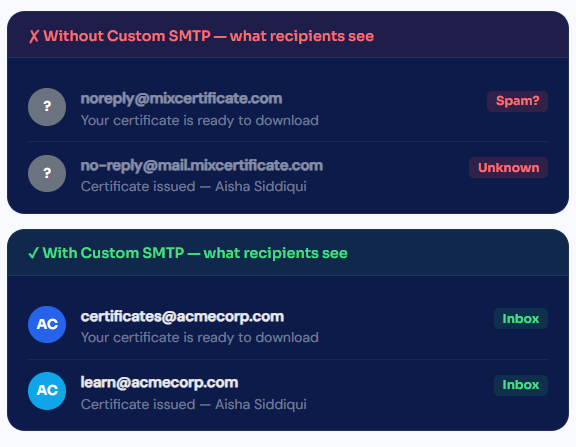
Default vs Custom SMTP
What changes when you connect your own server
- MixCertificate Default Sender
Gets the job done, but not as your brand
Emails go out from a shared MixCertificate sending address. Deliverability is reasonable but not optimal. Your organization’s name appears in the email body, not in the From field.
- From address is [email protected] or similar
- shared sender pool means other customer's behavior affects you
- Replies go to an unmonitored platform address
- SPF and DKIM pass on MixCertificate's domain, not yours
- Recipients may not recognise the sender
- Your Custom SMTP Server
Full brand control and better deliverability
- From address is [email protected]
- Your sending reputation, completely isolated
- Replies land directly in your inbox
- SPF and DKIM pass on your domain for better inbox placement
- Instant recognition recipients know who sent it
More than a From address change
Custom From Name and Address
Set any display name and email address you own. Recipients see exactly what you configure, whether that is "Acme Corp Certificates" or your team's first name.
SPF, DKIM and DMARC Support
Emails sent through your SMTP server inherit your domain's authentication records. Inbox placement improves because providers recognise your domain as a legitimate sender.
Replies Come Back to You
When a recipient replies to a certificate email, the message lands in your inbox. You stay in the conversation instead of losing it to an unmonitored platform address.
Your Sending Reputation
On shared senders, one bad actor's spam complaints can hurt your deliverability. Your own SMTP keeps your reputation separate and under your control.
TLS Encryption in Transit
All emails sent through custom SMTP are encrypted in transit using TLS. Your credentials are stored securely and never exposed in logs or error messages.
Full Send Logs
Every email sent through your SMTP connection is logged with delivery status, timestamp, and recipient. You have a complete record for auditing or troubleshooting.
Easy Process
Certificate Hosting: Automatic & Effortless
From generation to permanent hosting in milliseconds
Step 1: Generate Certificates
Create certificates through our platform using bulk upload, templates, or API integration. Design once, generate thousands.
Step 2: Automatic Cloud Upload
The moment a certificate is generated, it’s automatically uploaded to secure, redundant cloud storage across multiple geographic regions.
Step 3: Unique URL Assignment
Each certificate receives a permanent, unique URL on your custom domain: yourschool.edu/cert/[UNIQUE-ID]
Step 4: Global Distribution
Certificate URLs become accessible worldwide through our global CDN. Available from 200+ edge locations for fast loading anywhere.
Step 5: Permanent Hosting
Certificates remain hosted permanently with 99.9% uptime guarantee. No expiration dates. No renewal fees. Hosted forever.

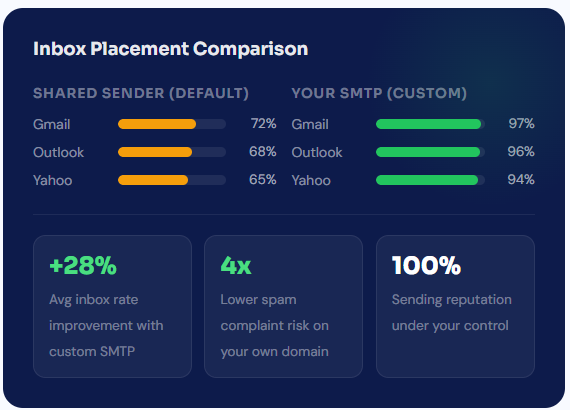
Your domain gets into inboxes that shared senders miss
Shared email infrastructure is convenient but noisy. Your certificates compete with everyone else on the same sender pool. When you bring your own SMTP, inbox placement is determined solely by your domain’s reputation, which you control completely.
- Inbox placement rates of 94 to 97 percent across major email providers
- SPF and DKIM pass on your domain signal to Gmail, Outlook, and others that your mail is legitimate
- Unsubscribes and complaints from other MixCertificate customers never affect your delivery
- Build sending reputation over time as more of your emails land in inboxes and get opened
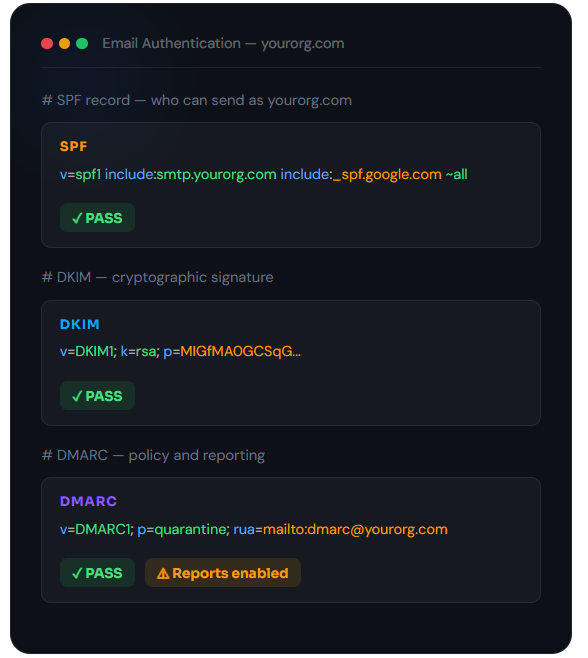
SPF, DKIM, and DMARC all work exactly as they should
When emails come from your SMTP server, they carry your domain’s authentication records. Email providers check these before deciding where to place the message. On your own domain, these checks pass cleanly, which means cleaner delivery and fewer false spam flags.
- SPF authorises your SMTP server as a permitted sender for your domain
- DKIM signs every email with a cryptographic key tied to your domain
- DMARC lets you control what happens to emails that fail those checks
- MixCertificate shows you the live authentication result after every test send
- No shared signing keys your DKIM signature belongs to your domain only
Start sending certificates from your own email address
#Custom Subdomain
Questions people usually ask first
Frequently Asked Questions
No. You just need your SMTP host, port, username, and password, which your email provider gives you. The setup form in MixCertificate takes about two minutes to fill in.
You can configure a default From address for your account and override it per-batch when you set up a send. Each batch can go out from a different address as long as your SMTP server permits it.
No. We handle 100% of hosting infrastructure servers, CDN, SSL certificates, backups, security updates, scaling. You never touch technical infrastructure.
We support files up to 50MB per certificate. Our CDN optimizes delivery for fast loading even with large files. We r
Yes. Certificates can be hosted on your custom domain or subdomain: certificates.yourschool.edu or credentials.yourcompany.com. We handle all DNS and SSL certificate configuration.
Port 587 with STARTTLS is recommended and works with the majority of providers. Port 465 with SSL and port 25 are also supported for servers that require them.
Our multi-region architecture ensures certificates remain accessible even if one AWS region goes down. Automatic failover to backup regions maintains 99.9% uptime guarantee.
Yes. You can set certificates to require authentication before viewing. Perfect for internal documents or sensitive credentials that shouldn’t be public.
Recipients simply click the URL in their email or type it into any browser. No app downloads, no account creation, no login required. Works on any device instantly.